Showing posts with label apertium. Show all posts

Saturday, November 29, 2008

foss.in 2008 :: Day 4

Day 4 @ foss.in 2008

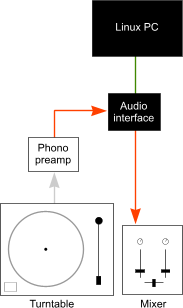
Indic BOFIndLinux Project BOF Indic BOF Indic BOF  Beacon project workout at foss.inBeacon Workout Apertium project talk Sharing ideas after Apertium talk Sachin Joshi ASR talk Sachin Joshi demo's his Hindi ASR system Flashing the Neo FreeRunner Connecting the FreeRunner with an USB cable and reseting it to boot from NOR dfu-util in action dfu-util in action flashing kernel/file system to neo freerunner dfu-util writes the kernel and File system images to the device Fedora Party On Just Messing Around ! OLPC XO in Foss.in Few more OLPC XO's sighted Lou Bébert brought it his ubuntu studio turntables hookup XwaX UI External USB sound card ( look at scheme diagram) Ubuntu Studio PC Aasim tries his hand at DJing Ramki nails another victim Don't wanna sing Don't wanna sing!

Thursday, July 3, 2008

Apertium: Open source machine translation

If you are interested in Machine Translation(MT) then you should read this great introductory article on Apertium MT system. Well I didn't know that Apertium is the open-source Systran (the engine that powers Babelfish) Did you? .

At the time of writing this post, there are no stable language pair for Indian languages in Apertium, If you are interested in working on one, do send me a shout out.

Kudos to Jimmy O'Regan for writing this one.

Monday, June 9, 2008

Lttoolbox Install Notes

Lttoolbox is a lexical and morphological analyser package from the Apertium machine translation system. Here is a brief install notes taken from my NLP summer school lab notes.

Build Lttoolbox

Download the lttoolbox source package from sourceforge.

tar zxvf lttoolbox-xxxxx.tgz cd lttoolbox-xxxxx/ make make install

You will need root level permission to install other dependency packages for lttoolbox . GNU Debian users however should use the lttoolbox debian package available in stable/testing/unstable and also read the Installing Apertium on Debian documentation page for more information.

Usage

If the tool is installed properly then you can look up the program install path with which lt-comp command.

Here I am compiling the Hindi dictionary with a left-to-right option lr, the output is stored in binary format in file 'mydata'. This binary file is used by the lt-proc processor to do the morph analysis.

lt-comp lr hi.dix.noun_f mydata lt-proc ./mydata

For more information do read the manual pages for the lt-comp and lt-proc tools or fire me a email, I would love to you help you.

Popular Posts