Showing posts with label firefox. Show all posts

Sunday, August 16, 2015

Developing Firefox Add-ons Video Tutorials

Do you want to develop add-on's for Firefox? Mozilla's Add-on SDK let's you create Firefox add-ons using standard Web technologies: JavaScript, HTML, and CSS. Recently I stumbled across Alexander Saladrigas's videos tutorials that teach Firefox add-ons development with Add-on SDK. The videos introduce you to the tools for creating, running, testing and packaging add-ons and working with buttons, panels and tabs.

Thank you Alexander for making these videos. Hope to see more from you in future.

Wednesday, April 30, 2014

The Web We Want: An Open Letter (Video)

The Web is our largest shared resource. Let's keep it free and open for us, and for the next generation.

What kind of Web do you want? Tell us: http://mzl.la/1hHyqBq


Learn more about at webwewant.mozilla.org and WebWeWant.org global movement to defend, claim and change the future of the Web.

Wednesday, January 15, 2014

Ubuntu Adobe Reader 9 Firefox Plugin Annoyance

Launching Firefox web browser on Ubuntu produces these debug files C:\nppdf32Log\debuglog.txt. It is quite annoying especially when developing Firefox Add-ons with Add-on SDK, I have to remove these debug files before committing my sources.

The Adobe Reader 9 plugin is source of this annoying problem. I usually remove the plugin and forget about it. However Robert Fleming provided a better solution.


$ cat C\:\\nppdf32Log\\debuglog.txt 
NPP_GetValue is called

Save this python program and run it with sudo to fix the problem.


#! /usr/bin/python3
# 
# Save and Run as:
# "sudo ./fix_nppdf.py /opt/Adobe/Reader9/Browser/intellinux/nppdf.so"
#

import mmap, sys

target = br'C:\nppdf32Log\debuglog.txt'
replacement = br'/dev/null'
replacement += b'\0' * (len(target) - len(replacement))

with open(sys.argv[1], 'r+') as f:
  m = mmap.mmap(f.fileno(), 0)
  offset = m.find(target)
  assert offset != -1
  m[offset:offset+len(target)] = replacement

Wednesday, December 25, 2013

Auto-Refresh Your Twitter Feed With Firefox Add-on

Pleasantly surprised to see my Firefox add-on mentioned on Mashable.com story Auto-Refresh Your Twitter Feed With These 2 Useful Tools. The add-on automatically loads new tweets as they appear without any user intervention. You can also use this add-on to display continuous real-time feed of tweets on a large screen or digital projector.


I had written this add-on during MozCamp Warsaw last year. I observed my fellow participant constantly clicking a button to reveal new tweets on Twitter.com. Using Add-on SDK I automated this tedious process. Add-on SDK allows developers to enhance the functionality of Firefox web browser using JavaScript. I love to use Add-on SDK to create such duct-tape solutions for Internet annoyances.

Saturday, June 22, 2013

Efforts continue to promote Firefox Maithili

Maithili is the native language 34.7 million people in Northern India and Eastern Nepal. In college I would try to follow the friendly banter in Maithili listening for similar sounding words in Hindi. It was only later while working on computational linguistics that I truly appreciated the richness of the Maithili language.

Firefox Maithili was released last year, making it 78th language to be added to Mozilla localization. The challenge of localization does not end after translating and shipping Firefox.Today Mozilla Maithili Localization team continues their efforts to promote Firefox Maithili by organizing workshops.

Maithili is not only a language, it is also a source of rich wisdom – Mr. Ajay Kumar Jha

On 29th May 2013, Mozilla Firefox Maithili workshop was organized by community of Maithili Computer developer working under Bhasha Ghar, a group of volunteers working for small languages having less resources. Mozilla Firefox Maithili workshop was a full day workshop where the community working with Mozilla along with some experts of Maithili language sat together to discuss the issues and challenges related to Firefox Maithili.
Read the complete Mozilla Firefox Maithili Workshop Report May 2013

Friday, May 17, 2013

Mozilla Localization Makes a Positive Social Impact

Mozilla brings power of the web into ordinary people's hands. Every day I spend countless hours working with volunteer communities around the world to translate Firefox web browser. Reading Sudheesh Singanamalla's blog post about his encounter with a farmer in rural India was such a touching experience.

A Localization journey - A Farmer's tale - A Delightful Experience

It was on my way back in a cramped out bus, travelling researching about language changes and variations within the state of Andhra Pradesh, that I sat next to a man, quite old.

Sudheesh and the old man

Me : What do you use in the internet? How do you talk to your son?
Old man: I go to Rajat's Net Cafe nearby by house and then talk from there on Google (meant Google+)
Me : Do you know how to read English and understand which button to click and so on?
Old man : Oh, i don't know English, but i use it in Telugu. The shop guy Rajat has seen me since he was small, so after my son went to Delhi, he separately bought a Telugu keyboard so that i can be using the keyboard.
Me: Okay, but then how do you read the information on the computer screen? Isn't that in English?
Old man : (Laughs) Don't you know, there is this software something called Firefox, it is in Telugu.
Me : Really? Can you tell me how the software looks?
Old man : You should know more, you're an engineering student but if you ask i'll tell you, its a small thing like this earth picture but a small cat , orange in colour is holding it.
Me: (smiling crazily) You know how to use it in Telugu?
Old man : Yeah, its not hard, I know how to read Telugu and also know how to use mouse, so clicking gets me the job done.
 

Tuesday, April 30, 2013

Barcamp Yangon 2013

Whoever said "Change is slow" hasn't been to Myanmar (also known as Burma). In seven short months, the country transformed into the something I now barely recognize. Getting Myanmar visa never been this easy, many direct flights to Yangon from all international hubs in South East Asia everyday. The Yangon airport is chocked with tourists, the prices just went through the roof. This time I didn't bring any crisp, unmarked hundred dollar notes to haggle for better exchange rate with the punters on the Yangon streets.

Walking out of the airport, I realized Myanmar has switched to driving on left side of the road. The roads are clogged with second-hand Japanese minivans, imported SUV's and decades old taxis jostling for space. For a moment, I longed for the small colorful Mandalay jeeps plying the quiet Yangon streets at sedate pace. Stuck in the traffic jam, I killed time by counting different cars with left and right steering wheels.

If you get stuck in the traffic jam, you can use the 3G mobile network to catch up with your email. Mobile SIM cards doesn't cost US$2000 anymore. Mobile SIM cards with data plan can be rented for $10 a day. If you are lucky you might even find $20 voice only tourist SIM cards. Mobile connections are still very expensive, it costs US$150-$200 for mobile connection. Perhaps it might soon change when the telecommunications market opens up in next few years.

Back in Myanmar after two years for Barcamp Yangon 2013, the biggest community organized un-conference in the world. This year over 6000 participants are expected to attend this event. Barcamps are hugely popular in this country, the event addresses the digital divide with open sharing and even help kick-start technology entrepreneurship activities.

Few years ago, young students would attend to use the free wireless internet access at Barcamp Yangon. Internet access was restricted to educational institutions and Internet Cafes. Today you can get internet connection in restaurants, cafes and even at home. It is easy to buy personal computers, smart phones and tablets locally. There will be explosive growth of internet users in Myanmar.

During Barcamp Yangon 2011 I kick-started the effort to translate Firefox web browser into Burmese. I have been mentoring the local Mozilla Myanmar community ever since. It had been a long road, we had many problems: building Mozilla community, finding volunteers for translations and deploying right web based localization tools. This trip to Myanmar would give me a chance to work with the community and resolve translation issues that are blocking Firefox Burmese release.

Barcamp Yangon 2013

Once again the barcamp organizers and volunteers efficiently organized such a large event. The event attracted significant
sponsorship this year, the talks in main rooms were marketing pitches from those sponsors. There were some interesting talks 'Make the web speak your language' and 'Women in technology' panel discussion. It was good to see many international participants at the event, they were in Myanmar on vacation and decided to attend the event. The Q&A session with the international barcampers was a good experience, it provided an opportunity for young Burmese barcampers to interact and get perspective on wide ranging subjects.
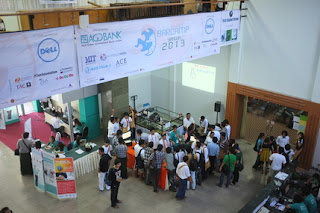
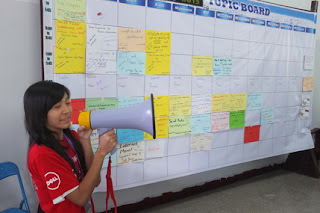
Barcamp Yangon Venue
Barcamp yangon Tech Talks
Make the web speak your language

In my talk How to become a Firefox Hacker I shared how one can leverage existing web development skills to contribute to Firefox. Mozilla Myanmar localization lead contributor Zinmin shared the Firefox localization process and gave a demo of Pootle web based translation tool. The participants were encouraged to join the Mozilla Myanmar community and localization sprint after the Barcamp Yangon.

Mozilla Myanmar localization demo by zinmin

Attending Barcamp Yangon gave me a good opportunity to keep the pulse the fast changing Myanmar. It was good to reconnect with the open source communities and meet people in technology and non-profit world. Next year I hope to attend Barcamp Mandalay, it seems to have more developer focused audience.

Ubuntu Myanmar Community

Mozilla Myanmar Localization Sprint

After Barcamp Yangon, Zinmin organized Burmese localization sprint in Yangon. The localization sprint provides hands-on training for new localizers. After a quick introduction from Zinmin and the team started translating remaining strings Firefox Aurora. The Pootle web based tool does perform well bandwidth constrained environment such as Myanmar. Zinmin cleaned up most of the translation errors that were blocking the productization of Firefox Burmese Aurora.

During the sprint, Sajal and I spent some time testing Firefox Mobile. Firefox Mobile is important in countries like Myanmar where there is a large growing mobile web users than desktop users. However due to economic sanctions Google Playstore is not available in this country. Burmese users resort to various alternative app stores to find apps for Android devices. Another problem is network latency, for instance, tweeting pictures was really difficult. We looked in how to test Android apps network latency and performance issues.

You can read more about Mozilla L10N sprint on Zinmin's blog post in Burmese and the download the latest Firefox Burmese Aurora here.

Technology Entrepreneurship and Start ups in Myanmar

Spent some time meeting various technology entrepreneurs in Yangon. Start-up incubators like Rocket Internet and few others opened shop in Myanmar. Expats and Burmese diaspora are returning to start technology start-ups. Along with opportunities from the burgeoning economy there are challenges: People with good technical skills are hard to come by, the overhead costs are really high due to inflated prices.

I hope you'll get a chance to visit Myanmar and experience its rich culture. Perhaps you might wanna join the
Barcamp Yangon next year or spend some time working I'll help you find a co-working space in Yangon.

Wednesday, February 27, 2013

Mozilla Tagalog Localization Hackathon in Manila

Philippines has rich linguistic diversity. Through out its history Philippines was influenced by language and traditions of those who came in search of gold and other precious minerals. Today, you can hear smattering of Sanskrit, Arabic, Chinese, English, and Spanish in Tagalog.

Tagalog is the widely used Philippine dialect. Filipino, the National Language of the Philippines is composed primarily of Tagalog words, idioms, and phrases. Urban Filipinos are fluent in English. Traveling few hours away from Metro Manila, I noticed people preferred to speak in Tagalog.

The Mozilla Tagalog localization was kick-started by Seth Bindernagel around 2010. After a hiatus, the Tagalog localization effort now gained momentum thanks to good leadership and innovative community initiatives to encourage localization (See Help Us Translate Firefox Aurora to Tagalog & Get a Mini-Shirt). We also have new localization teams for Chavacano, Bikol and Lloko languages.

The hackathon in Manila provided me an opportunity to connect with the teams and I hope to keep this momentum going. Shared few ideas and emphasized on quality and consistence of translation. Such events are good for not only attracting new translators, but also discuss the problems in translation. The event attracted students, bloggers, technology professionals and contributors from Tagalog Wikipedia.

Talking to tagalog translators in manila

The Firefox Tagalog localization looks very promising. Came back from the hackathon with confidence that we can start productization very soon. And don't forget to join the next Tagalog Firefox Translation Marathon on April 9, 2013

Sunday, February 17, 2013

National Open Source Conference of Afghanistan (NOSCA) 2013

This week National Open Source Conference of Afghanistan (NOSCA) starts in Jalalabad, Afghanistan. The event is organized by the National ICT Alliance of Afghanistan. It will be held at Nangarhar University on February 19-21, 2013. Unfortunately I will not be able to attend this event. Please share the conference information with your friends in the region and encourage people to participate.

Building a Mozilla community in Afghanistan is on my list. During ICANN 41 Singapore I met few technologists from Afghanistan and remained in touch with them ever since. Last year we kick-started Firefox Aurora Pashto and Dari localization effort.

Communications in Afghanistan has grown considerably. Entrepreneurship is thriving despite the problems. Recently Divon Lan wrote about Afghanistan's first women technology entrepreneur on his blog.

Get in touch with me, if you want to get involved in Mozilla Afghanistan community building effort.

Monday, February 11, 2013

Firefox Responsive Design View to rescue

Here is a good example of using Firefox Responsive Design View, DOM and Style Inspector to debug web design issues. Noticed this problem with Mozilla The Den blog's site description while browsing the web with Firefox Mobile browser. Fired up my laptop to check this design issue with Firefox Responsive Design View. Then I used the DOM and Style Inspector to zero in on the CSS rule that adds this extra padding (padding-right: 340px;). Voila! It is time to send this patch to the developer.

Debugging and Fixing CSS issues with Firefox Web Developer tools

Did a screen capture of the whole process. Don't see the embedded video, you can watch it on YouTube.


Saturday, February 9, 2013

Mozilla Firefox Vietnamese Beta Released

Mozilla Firefox Vietnamese (19 Beta) was released this week. It is the culmination of my two year effort to re-animate the Mozilla Vietnamese localization team.

Building an active Mozilla community in Vietnam was the first step. Found few passionate young volunteers in the local open source community in Hanoi. Spent the next year mentoring these young volunteers into community leaders. Participation in local events attracted others to join the new Mozilla Vietnam community. Hands on Mozilla developer workshops and Mozilla localization sprints ensured that we retained most these new contributors.

Contributions to Mozilla Firefox Vietnamese localization had been stagnant since last fourteen rapid release cycles. During this period the Vietnamese Firefox had many parts of the browser untranslated thus hampering user experience of the browser. Community driven open source projects often suffer when active contributors leave. Building sustainable communities tackle this problem with new contributors stepping in to take up the reins.

Mozilla Localization community members working on translating firefox strings into vietnamese

I had been organizing Mozilla Localization sprints since August 2011. We met at the Hanoi community space, working on localization strings using web based translation software such Narro and Pootle.The localization sprints with small groups provided a good opportunity to develop localization skills of new contributors and improve the quality of translations as well.

Thanks to efforts of these Mozilla Vietnamese Localization (L10N) community members, We have a fully localized Firefox Vietnamese Beta release.

  • Trương Anh Tuấn
  • Nguyễn Hà Dương
  • Đàm Tiến Long
  • Nguyễn Phan Hải
  • Đặng Duy Thanh
  • Ngô Trung
  • Nguyên Thế Hùng
  • Tuan Zendf
  • Hakuna Matata
  • Nguyễn Vũ Hưng

Don't forget to Download Firefox Vietnamese Beta today.

Saturday, February 2, 2013

Using Firefox Remote Debugger with Firefox OS Simulator

Firefox OS App developers can use Firefox Remote Debugger to quickly fix web app bugs. In this screencast Jeff Griffiths shows the current workflow of using the Firefox OS simulator and the Firefox Nightly remote debugger developer tool.


Don't see the embedded video, you can watch it on YouTube.

You can also use Firefox Remote Debugger with Firefox OS running in a desktop emulator, on a Firefox OS device and Firefox Mobile on Android mobile phone. Head over to Mozilla Developer Network (MDN) to learn more about Firefox Remote Debugging.

Thursday, January 31, 2013

Mozilla Community Engagement in Laos

Just across the border lies Laos. This country of fun loving gentle people had a tumultuous history. I recently visited Laos for the first time to help build Mozilla community in Laos.

Writer Thomas Wanhoff lives Vientiane. He is the organizer of Barcamp Vientiane. Mozilla participated in the previous Barcamp Vientiane. Thomas helped me understand the Lao history and culture over few bottles of dark Lao beer. Lack of infrastructure and resources hampered economic growth of Laos. Development aid that poured into this country had made very little difference. Recent efforts to develop internet entrepreneurship haven't been successful. Laos is slowly overcoming these problems. The 3G mobile network provides inexpensive internet connectivity. Large construction projects can be seen in Vientiane, new roads are replacing the pot holed dirt roads.

Visited ICT Association of Laos to talk about the Mozilla mission to promote innovation and choice on the web. Presented a demo of FirefoxOS and interacted with the team of localizers who are interested in localizing Firefox in Lao.

Arky interacting with ICT Association of Laos

Also visited the ICT Center at Dang Dok Campus of University of Laos(NUoL). The university campus is connected with high-speed optic fiber network. ICT Center staff gave me tour of their new e-learning centers computer lab and digital multimedia studio and post-production facilities. The ICT center team expressed their interest to support Mozilla activities.

Now Lao web fonts are available Google web fonts (Early Access) system. This would enable Lao speakers to read localized content on computers and mobile devices that do not include Lao fonts.

The Mozilla Story with Lao Subtitles (Translated by Patthana Vilay)


Next step towards building Mozilla Lao community is get a core team organized and plan community events such as Mozilla Web Maker, Web developer events and Mozilla Lao Firefox localization sprints. Get in touch with me, if you want to get involved in Mozilla Lao community building effort.

Monday, January 28, 2013

Speeding Up Software Rebuilds with CCache

Software developers who routinely rebuild large projects would love ccache. Ccache is a compiler cache. It speeds up software rebuilds by caching the result of previous compilations and detecting when the same compilation is being done again.

I use ccache when compiling Linux kernel, Debian/Ubuntu packages, GNOME applications, Mozilla Firefox, FirefoxOS and Android operating system. You could enable ccache by prefixing ccache to your compilation command or update your system path to include ccache.


# Add the following line to your ~/.bashrc file 
export PATH=/usr/lib/ccache:${PATH}

Alternatively you could create symlinks in ~/bin directory. GNOME 3 jhbuild documentation provides a bash script for this purpose.


cd ~/bin
for cmd in cc gcc c++ g++; do
  ln -s /usr/bin/ccache $cmd
done

To take advantage of ccache while building Mozilla Firefox, append the following line to your .mozconfig.


ac_add_options --with-ccache

If you are compiling Android(ASOP), CyanogenMod or Firefox OS. Android build system includes the ccache program, set the USE_CCACHE environment variable to enable ccache.

$ export USE_CCACHE=1

Further more in-depth information, read the ccache manual page. Please do comment and share your experiences using CCache.


Sunday, December 16, 2012

Barcamp Phnom Penh 5

Last year we kick-started Mozilla Firefox Aurora Khmer localization effort at Barcamp Phnom Penh 4. Now a year later, Thanks to efforts of Mozilla Khmer L10N team and invaluable support of several people from various organizations. We have a successful release of Firefox Khmer.

Barcamp Phnom Penh is community organized two day un-conference held in the capital city of Cambodia. Walking around Barcamp Phnom Penh at University of Puthisastra in central Phnom Penh, you'll encounter young Cambodian's engaging in social media on latest smart phones and tablets everywhere. There are numerous booths advertising smart phones, right next English language schools, Media and NGO organizations.

At Barcamp Phnom Penh 5 this year there was marked improvement in quality of talks. The technology related talks were really in-depth and encouraged participation from audience. Cambodia has good English language penetration, learning English ensures better livelihood. In country where 50% of population live below the poverty line, the Cambodian youth have an insatiable thirst for learning and making a better life. This spirit attracts me to Cambodia time and again.

Firefox Khmer, FirefoxOS and Web API

On the first day of Barcamp Phnom Penh, I talked Mozilla mission and future of Web, As a platform. The demo of development version of FirefoxOS phone was well received.

The next day Vannak ENG talked about the about Mozilla localization and walked the audience through various steps of translating Firefox. It was great to see people hanging out after the talk to interact with Vannak. Such interactions help us build a good contributor community and help keep the Firefox translations update-to-date every 6 weeks

Mozilla Khmer L10N demo

At the end of Barcamp Phnom Penh, I gave lightening talk titled '6 kick-ass things you can do with your browser'. The talk provided a whirlwind tour of Mozilla Web API and their status.

Khmer Language support in Firefox Mobile on Android 4.1 (Jelly Bean)

I met Danh Hong, the creator Khmer Web Fonts and we talked about the font rendering issues in Firefox Mobile(Bug 793474) running on Android Jelly Bean (4.x). These issues are now resolved in new HarfBuzz update (Bug 780409)

Mozilla Firefox Mobile showing Khmer page

Few other issues in Khmer language support remain. Android Jelly Bean (4.1) supports Khmer rendering well, but Khmer fonts are not shipped with Android. You need to use third party app to install them.

On Desktop computers, though high quality Khmer fonts are available for various operating systems. There is lack of proper documentation about the installation process and the license are not very clear.


Upcoming Barcamps in Cambodia

The barcamp camp team deserves a pat on the back for organizing yet another fantastic event. Next year they are organizing five Barcamps all over Cambodia.

Perhaps I'll try organize a hands-on workshop on web technologies at Hacker Space Phnom Penh or Small World Phnom Penh. If you are interested, get in touch with me.


Thursday, May 24, 2012

Ideas for Improving Locale Management in Firefox

Mozilla Firefox Localization project spans 90+ languages across the planet. If you haven't used Firefox in a different language, try downloading a language pack and change Firefox user interface language by editing general.useragent.locale preference setting using about:config. Captian Caveman created an easy to use Quick Locale Switcher Firefox addon for this purpose.

In this post, I'll explore some ideas to improve the locale management experience inside Firefox. The idea adds unified search, installation and language switching capabilities to Firefox Language panel. You will find Firefox Language panel under Tools > Addons menu. Currently the language panel on Firefox Nightly build looks like this.


Firefox Languages panel

Firefox Language Panel Mockup

The mockup below describes searching, installing and switching locales workflow. This is similar to existing Firefox Add-ons workflow.


Firefox Language Switching Workflow

  • Enable Firefox Language Tab:Make Tools > Languages visible at all times. Currently Firefox hides this dialog when no language packs are installed.
  • Switch Firefox Default Language: Default Language Switch button "Default Language is 'English (US)', Do you want to change the language of Firefox?"
  • Search Languages: Modify search box to limit search to language packs on addons.mozilla.org.
  • Language Management: Provide Switch Locale toggle button next to each installed language pack.
  • Switch Language for this session only:Allow users to switch locale for this session only.
  • Get New Language: List download-able Locale packs on the main screen.

Please share your thoughts, suggestion and criticism using the comment form below.

If you are a Firefox hacker looking for something new to hack on, this is your lucky day! .

Sunday, May 20, 2012

Samsung Galaxy S2 Accessories For Presentations

In this post we'll explore some effective presentations techniques using Samsung Galaxy S2 accessories. Use the Droid@Screen (See this blog post) program to display the mobile phone screen on my computer during my presentations. This program works by taking a continues series of screenshots of the phone screen. There are some problems with this design, there is noticeable delay during application interaction and the video performance is not great on my Lenovo X120e Ubuntu computer.

You can not demonstrate audio and video capabilities of the mobile phone using such software. Planning to give a talk about using Firefox Mobile with Android 4 screen-reader and existing solutions doesn't work for me.

Samsung Galaxy S2 HDTV Adapter

This adapter allow you to plug in your phone directly into HDMI large displays and digital projectors. The mobile phone AC charger powers the adapter and no additional audio cable is needed. The Samsung HDMI adapters are available for Samsung Galaxy phones and tablet models.

This works really great if you are planning to setup large screen display in a exhibition booth. Connect the phone to large screen display with HDMI cable and play your video demo in a loop.


Samsung Galaxy S2 Power Pack

The Samsung Power Pack comes handy when phone runs out of battery in the middle of the presentation. It does extend the battery life of the phone during the presentation or an extending application testing session.

Few caveats using these accessories. The HDMI adapter will not work when the phone is attached to the power pack .

This power pack has some issue with power sensing, sometimes it starts and stops charging with annoying beeps every 10 seconds. And you need to press locking mechanism tight to get the phone to charge. Hope someone at Samsung fixes this problem.


Thursday, May 17, 2012

Unset Google Chrome as default browser on Ubuntu

Update: After further investigation, I found is the problem is in google-chrome application not in Chromium-browser. My Mistake!

Dietrich Ayala brought this problem to my attention. For some reason google-chrome browser constantly makes itself the default browser on Ubuntu 10.10 and later versions. This is annoying when you are testing Firefox Nightly Ubuntu builds. You can choose to remove the google-chrome, but that is not a solution.

First, I tried to reproduce this problem on multiple Ubuntu machines. To reproduce this problem, installed Firefox nightly using Firefox Nightly PPA. Remove any other browsers expect google-chrome.


It took very long time to find the solution to this problem. The chromium-browser package adds /usr/local/share/applications/mimeinfo.cache which supersedes the default system application settings. The solution is edit this file and make it read-only using chattr command.


$ sudo nano /usr/local/share/applications/mimeinfo.cache 
[MIME Cache]
application/earthviewer=google-earth.desktop;
application/keyhole=google-earth.desktop;
application/vnd.google-earth.kml+xml=google-earth.desktop;
application/vnd.google-earth.kmz=google-earth.desktop;
application/xhtml_xml=google-chrome.desktop;
text/html=google-chrome.desktop;
text/xml=google-chrome.desktop;
x-scheme-handler/ftp=google-chrome.desktop;
x-scheme-handler/http=google-chrome.desktop;
x-scheme-handler/https=google-chrome.desktop;

#Remove all the google-chrome entries, like this.
[MIME Cache]
application/earthviewer=google-earth.desktop;
application/keyhole=google-earth.desktop;
application/vnd.google-earth.kml+xml=google-earth.desktop;
application/vnd.google-earth.kmz=google-earth.desktop;

# Make it read-only even for super-user
sudo chattr +i /usr/local/share/applications/mimeinfo.cache


After making these changes. Open Firefox Nightly and make it the default browser. Now this system setting will remain unchanged.


Monday, March 26, 2012

Building Boot2Gecko(B2G) on Ubuntu

Update: This documentation is out-of-date: Please read developer.mozilla.org/en-US/Firefox_OS/Building for latest information

You heard about Mozilla Boot2Gecko(B2G) mobile operating system. Boot2Gecko's Gaia user interface is developed entirely using HTML, CSS and Javascript web technologies. If you are an experienced web developer you can contribute to Gaia UI and develop new Boot2Gecko applications with ease. In this post I'll explain how to setup the Boot2Gecko (B2G) development environment on your personal computer.


You can run Boot2Gecko(B2G) inside an emulator or inside a Firefox web browser. Using Boot2Gecko(B2G) with QEMU emulator is very resource intensive, so we will focus on the later in this post. I'll assume you are comfortable with Mozilla build environment. So, get that pot of coffee brewing and prepare for a long night of hacking.


Building Boot2Gecko(B2G) Firefox App


Before you start, let us make sure that you have all the prerequisites for building Firefox on your computer. Please have a look at the build prerequisites for your Linux, Window and OSX operating system.


# Let get the source code 
# Download mozilla-central repository 

$ hg clone http://hg.mozilla.org/mozilla-central mozilla-central

# Download the Gaia source code 

$ git clone https://github.com/mozilla-b2g/gaia gaia

# Change directory and create our profile 

$ cd gaia 

$ make profile 


# Change directory into your mozilla-central directory

$ cd mozilla-central


# Create a .mozconfig file inside your mozilla-central directory: 

$ nano .mozconfig 
mk_add_options MOZ_OBJDIR=../b2g-build
mk_add_options MOZ_MAKE_FLAGS="-j9 -s"
ac_add_options --enable-application=b2g
ac_add_options --disable-libjpeg-turbo
ac_add_options --enable-b2g-ril
ac_add_options --with-ccache=/usr/bin/ccache 

# Build the Firefox B2G app and wait for the build to finish 

$ make -f client.mk build 


# Create a simple b2g bash script to launch B2G app; change paths you suit your environment
# Note: Have to use to -safe-mode option due to bug on my Ubuntu box 
 
#!/bin/sh 
export B2G_HOMESCREEN=http://homescreen.gaiamobile.org/
/home/arky/src/b2g-build/dist/bin/b2g -profile /home/arky/src/gaia/profile


If everything goes well. You should have boot2gecko running inside a firefox now.


Boot2Gecko running inside firefox on Ubuntu


Customizing Firefox B2G App

For better Boot2Gecko (B2G) experience, we will customize Firefox features offline cache and touch events using a custom Firefox profile.


Create a Custom Firefox Profile


You can use dist/bin/b2g -ProfileManager option to launch Firefox Profile Manager. Create a new profile called 'b2g'. Now we can add customizations to this new profile.


On Linux computers, the profile is created under ~/.mozilla/b2g/ directory. You can find the information about location of firefox profiles for your operating system here.


You launch B2G with your new custom profile using the '-P' option. Modify your B2G bash script and add the custom profile option. dist/bin/b2g -P b2g


Disable offline cache


Create a user.js file inside your custom 'b2g' firefox profile directory. Add the following line to disable offline cache.

user_pref('browser.cache.offline.enable', false);


Enabling Touch events


Add the following line in your user.js file inside your custom 'b2g' Firefox profile directory to enable touch events.

 user_pref('dom.w3c_touch_events.enabled', true);


That's it. You now have a Boot2Gecko(B2G) running inside Firefox on your computer. Happy Hacking!

Friday, March 9, 2012

Samsung Galaxy S2 GT-i9100G: Review, Firmware, Software Update, Rooting

Mozilla Mobile Test Drivers program lent me a Samsung Galaxy SII mobile phone to test the nightly builds of Firefox Mobile. This Android 2.3.6 (Gingerbread) phone runs off a powerful dual core A9 1.2 GHz processor with a good responsive capacitive touch screen. The device is impressive and attracts a lot of attention everywhere.


Samsung Galaxy S2 Android 4.0 (ICS) Update


On March 10, 2012 Samsung will release an firmware update for Android 4.0 code named Ice Cream Sandwich. You will find the upgrade information here on Samsung website.


Android 4.0 promises to offer better accessibility and internationalisation support. You can navigate the android phone built-in screen reader using touch gestures. There is much better rendering support for Asian languages and additional Unicode fonts are bundled with the release.


Cyanogenmod Firmware for Samsung Galaxy S2 (GT-I9100G)


The Cyanogenmod has been boon for mobile phone technophiles. The project provides customised firmware for wide variety of phones. Unfortunately Samsung Galaxy S2 (GT-i9100G) is not well support by Cyanogenmod project. Why? Samsung had changed the hardware specification of this model and none of Cyanogenmod developers have this phone model to work on.


Last week, Yang and I spent an afternoon looking for compatible firmwares to root Samsung Galaxy S2 (GT-i9100G) . After few failed attempts we found that MyGKernelV1.1.1_CWM5.tar version managed to give us root access to the phone.


Installing Boot2Gecko on Samsung Galaxy S2 (GT-I9100G)


You have heard of Mozilla Boot2Gecko. The Mozilla entry into smart phone market was unveiled at Mobile World Congress last week. Build with HTML5, CSS and Javascript, it allows web developers an open phone stack for their applications.


The Mobile World Congress Boot2Gecko videos shows a Samsung Galaxy S2 running Boot2Gecko. You should take note that this Samsung Galaxy S II model is GT-I9100. The Boot2Gecko developers use Samsung Galaxy S2 as their development platform.


Since Cyanogenmod scripts are used for Boot2gecko installation. You won't be able to install it on Samsung Galaxy S2 (GT-I9100G) without lot of hacking. Recently there has been a lot of talk about people dying to install Book2Gecko on Samsung Galaxy S2. Caveat Emptor.


Popular Posts