Showing posts with label python. Show all posts

Wednesday, March 19, 2014

Using Archivemail to pruning Mailman archives

The mailman server I maintain for a local non-profit is running out of disk space.Time for some spring cleaning. Decided to archive all mailing-list archives older than 2 years. Grabbed the nifty Archivemail python program and installed with 'python setup.py'.

The archivemail is a tool for archiving and compressing old email in mailboxes. It moves messages older than the specified number of days to a separate mbox format mailbox that is compressed with gzip.

Don't forget to back up mailman mbox files before you start pruning mailman archives.


# Prune mbox file
$ cd /var/lib/mailman/archives/private
$ archivemail --days=550 name-of-list/list.mbox 

# Wipe and rebuild archive
$ cd /usr/lib/mailman
$ bin/arch --wipe 

Thursday, February 20, 2014

Sugar Learning Platform

Last weekend I attended the Vietnam Tech Conference 2014 in Hanoi. The event brought together educators from across south east asia to learn and share about the use of technology within the classroom.

My talk introduced the Sugar learning platform that was developed for OLPC laptops. Designed from the ground up especially for children. Sugar User Interfaces moves away from traditional 'desktop' metaphor. It makes collaborative learning a fun experience. There are numerous activities that promotes self-learning.


What is Sugar on a stick?

Sugar on a Stick is a Fedora® Spin Live USB operating system featuring the award-winning Sugar Learning Platform and designed to fit on an ordinary USB thumbdrive ("stick").

It will run on any recent x86-based computer that can boot from a USB stick (check the BIOS settings if it doesn't work straight away). This includes most Windows and Linux PCs and x86 Macs.

You can use SoaS to demo Sugar almost anywhere without disturbing the contents of the computer you use, and if people like what they see, you can install Sugar on a Stick to their hard drives or other sticks from the demo stick.

Learn more about Sugar on a stick here.

Wednesday, January 15, 2014

Ubuntu Adobe Reader 9 Firefox Plugin Annoyance

Launching Firefox web browser on Ubuntu produces these debug files C:\nppdf32Log\debuglog.txt. It is quite annoying especially when developing Firefox Add-ons with Add-on SDK, I have to remove these debug files before committing my sources.

The Adobe Reader 9 plugin is source of this annoying problem. I usually remove the plugin and forget about it. However Robert Fleming provided a better solution.


$ cat C\:\\nppdf32Log\\debuglog.txt 
NPP_GetValue is called

Save this python program and run it with sudo to fix the problem.


#! /usr/bin/python3
# 
# Save and Run as:
# "sudo ./fix_nppdf.py /opt/Adobe/Reader9/Browser/intellinux/nppdf.so"
#

import mmap, sys

target = br'C:\nppdf32Log\debuglog.txt'
replacement = br'/dev/null'
replacement += b'\0' * (len(target) - len(replacement))

with open(sys.argv[1], 'r+') as f:
  m = mmap.mmap(f.fileno(), 0)
  offset = m.find(target)
  assert offset != -1
  m[offset:offset+len(target)] = replacement

Sunday, January 5, 2014

Using Sugar Learning Platform on Ubuntu

Sugar makes learning fun. There are many activities that encourage children to develop critical thinking skills. The Sugar user interface was developed for One Laptop Per Child (OLPC) project.

In this blog post, I'll share instructions to setup Sugar as alternative desktop environment on Ubuntu. Perhaps schools will adopt this setup to provide different desktop environment for students of various ages groups. At home, parents can share the home computer with their children.

Installing the Sugar Environment

These instructions were prepared on Ubuntu gnu/Linux 13.04 operating system. Please read this wiki page for further instructions.

# Download the sweets installer shell script 
$ wget ftp://download.sugarlabs.org/packages/sweets-distribution.sh

# Add executable bit to the script
$ chmod +x sweets-distribution.sh

# Run the scripts with sudo program. 
$ sudo ./sweets-distribution.sh 

# Check the status of 'sweet-distribution' program.
$ sweets-distribution status
Platform:
   Ubuntu-13.04

Selected repository:
   Factory

Packages to sync:           
   (import GPG keys)

Available repositories:
   0.94:SugarNetwork            
   Factory

-- Hint: Use "sync" command to synchronize packages

# Select 'Factory' as default distrubution channel.
$ sudo sweets-distribution select Factory

# Download the package descriptions. 
$ sudo sweets-distribution sync 

# Now install all the packages using apt-get package manager.
$ sudo apt-get install sweets-desktop

# Test the deployment by launching Sugar emulator.
$ sweets-sugar-emulator

Unfortunately there aren't many Sugar activities packaged for Ubuntu. Let's start with installing browse activity. Download browser activity and save to your ~/Documents folder or external flash drive. To install open the downloaded .xo file with Journal activity in the Sugar emulator.

You can now use the browse to download and install more activities from activities.sugarlabs.org. You can learn more about installing activities by reading the Sugar manual.

That's all. Now you can select Sugar at the graphical login screen. Do share your experience using Sugar Learning Platform.

Friday, January 20, 2012

Installing Sikuli Automation Tool on Ubuntu 11.10

Sikuli is a cross-platform automation tool. The software uses computer vision technology to automate UI testing.

In this blog post I describe how to install and setup Sikuli on Ubuntu 11.10 OS.

Download the latest version of Sikuli (http://sikuli.org/download.shtml) and uncompress the zip file. You can also install Sikuli using Ubuntu package manager.


$ sudo apt-get install sikuli-ide

You will need OpenCV 2.1 or later to use Sikuli. If you see the following error, the OpenCV libraries are probably missing on your computer.


java.lang.UnsatisfiedLinkError: /tmp/tmplib/libVisionProxy.so: libml.so.2.1: cannot open shared object file: No such file or directory

Install OpenCV 2.3 on Ubuntu 11.10

Thanks to Gijs Molenaar we now have OpenCV 2.3 packages for Ubuntu. You can find full installation documentation here.

Open terminal and type the following commands to install OpenCV 2.3 packages. Remember to uninstall older OpenCV versions before you do this.


  $ sudo add-apt-repository ppa:gijzelaar/cuda
  $ sudo add-apt-repository ppa:gijzelaar/opencv2.3
  $ sudo apt-get update
  $ sudo apt-get install libcv-dev

Other Required Tools

The Sikuli documentation fails to mention that you need wmctrl package to launch and control GUI applications on Linux.

 $ sudo apt-get install wmctrl 

You are done!

You can now launch Sikuli by typing /usr/bin/sikuli-ide in the terminal program.

Thursday, November 11, 2010

Getting Started With Sahana-Eden

I was introduced to Sahana Open Source Disaster Management Platform few years ago at FOSS.in 2008. But never contributed any code to this project until the SahanaCamp 1.2 in Hanoi last week.

Sahana-Eden is based on web2py python web development framework. Coding with Model-View-Control(MVC) framework is breath of fresh air and I dived headlong into the code on day one of the event. Thanks to Fran Boon, for helping creating this quick tutorial for Sahana-eden developer setup.


# Get all dependent packages for sahana-eden 
sudo apt-get install python-lxml python-reportlab python-xlwt python-shapely libgeos-3.2.0

# Create a directory to store web2py and sahana-eden source files
mkdir ~/Sahana

cd Sahana

# Checkout web2py source code
bzr branch lp:~mdipierro/web2py/devel web2py

# web2py applications are stored in directory
cd web2py/applications

# Checkout sahana-eden source
# Note web2py doesn't like - in directory names (Thanks fran!)
bzr branch lp:sahana-eden eden

# Change to base directory
cd ~/Sahana

# Launch rocket web server with password 'eden' 
python web2py/web2py.py -a eden 
web2py Enterprise Web Framework
Created by Massimo Di Pierro, Copyright 2007-2010
Version 1.85.3 (2010-09-18 07:07:46)
Database drivers available: pysqlite2
Starting hardcron...
please visit:
       http://127.0.0.1:8000
starting browser...in 5 seconds

# Open the webpage and login with password 'eden'
firefox http://127.0.0.1:8000/eden

# On first run, sahana-eden creates 000_config.py and cron/ files
# Change FINISHED_EDITING_CONFIG_FILE = True in 000_config.py file
nano web2py/applications/eden/models/000_config.py

# You are done! Start hacking and send it your patches!

Wednesday, October 6, 2010

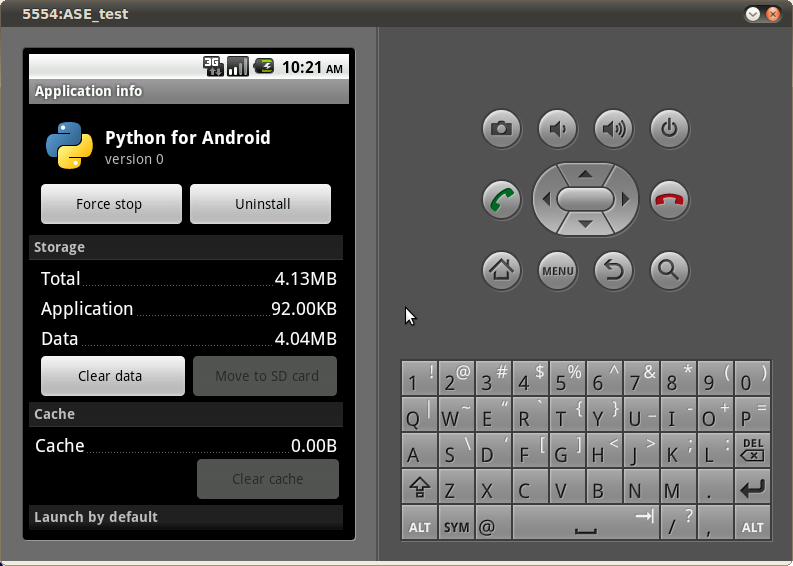
Installing Python on Android

Had left the Openmoko Linux phone and aging Nokia N70 back in India. Now I travel with a basic model phone, do miss hacking phone.

This morning I decided to change all that. Checking out Python Scripting Layer For Android using the Android SDK. My Nokia also ran Python S60 until the project lost wind. Getting the android environment on Ubuntu was easy thanks to Eric's tutorial


Sunday, December 6, 2009

Trivandrum Mapping Party 12 December 2009

After the first Open Street Map (OSM) mapping party in Calicut few months ago, we decided to organize more such parties. I suggested to have another one during the Scipy 2009. We are going meetup on sidelines of the conference and have a mapping party. Please join us here in Trivandrum (Kerala) on 12 December 2009.

More information about the event is available on the Trivandrum Mapping Party wiki page

Wednesday, October 14, 2009

PyCon India 2009

Most action happens on conference sidelines PyCon India 2009 is no expection. You can always watch the recordings of talks later on. Catching up with friends comes first. Sharing ideas about projects, events and just talking all things geek. Good to hear that Santhosh was interested about integrating dhvani with speech dispatcher for Orca screen reader. Sharing experiences of working with non-profits with Sayamindu and talking about accessibility issues on OLPC SUGAR. And exploring possibilities of doing Ubuntu Karmic release parties in Chennai and Bangalore with Parthan (technofreak), Renuka and Debayan.

I did catch few of the lectures of Ramakrishna on Enterprise Linux, Parthan and the presentation by the FOSSEE team.

Parthan Python newbie talk The Mallu Gang ! Praveen shows his Android G2 Baij T-shirt with topsy turvy logo What's Reappy ? Jinesh checking out Samsung mobile (Q2?) Hiran hacking my T-shirt with a pen :) The Food was Good! Where are the crowds ? Ah! 75 students took off to see the city! Prabhu Ramchandran charms the crowds The feedback !

Sunday, July 19, 2009

NLTK Installation with Python easy_install

Few weeks ago I wrote the NLTK on Ubuntu Quick Start Guide. Now with the release of NLTK (Natural Language Toolkit) 2.0b5 today the NLTK installation has been greatly simplified thanks to the nltk python egg (See Changelog).

To get started with NLTK install, you first need the python-setuptools package.


$ sudo apt-get install python-setuptools 
Reading package lists... Done
Building dependency tree       
Reading state information... Done
The following NEW packages will be installed:
  python-setuptools
0 upgraded, 1 newly installed, 0 to remove and 0 not upgraded.
Need to get 195kB of archives.
After this operation, 909kB of additional disk space will be used.
Get:1 http://in.archive.ubuntu.com karmic/main python-setuptools 0.6c9-0ubuntu4 [195kB]
Fetched 195kB in 9s (20.2kB/s)                                                 
Selecting previously deselected package python-setuptools.
(Reading database ... 106971 files and directories currently installed.)
Unpacking python-setuptools (from .../python-setuptools_0.6c9-0ubuntu4_all.deb) ...
Setting up python-setuptools (0.6c9-0ubuntu4) ...

Now lets install the NLTK with easy_install program. $ sudo easy_install http://nltk.googlecode.com/files/nltk-2.0b5-py2.6.egg Downloading http://nltk.googlecode.com/files/nltk-2.0b5-py2.6.egg Processing nltk-2.0b5-py2.6.egg creating /usr/local/lib/python2.6/dist-packages/nltk-2.0b5-py2.6.egg Extracting nltk-2.0b5-py2.6.egg to /usr/local/lib/python2.6/dist-packages Adding nltk 2.0b5 to easy-install.pth file Installed /usr/local/lib/python2.6/dist-packages/nltk-2.0b5-py2.6.egg Processing dependencies for nltk==2.0b5 Searching for PyYAML==3.08 Reading http://pypi.python.org/simple/PyYAML/ Reading http://pyyaml.org/wiki/PyYAML Best match: PyYAML 3.08 Downloading http://pyyaml.org/download/pyyaml/PyYAML-3.08.zip Processing PyYAML-3.08.zip Running PyYAML-3.08/setup.py -q bdist_egg --dist-dir /tmp/easy_install-T7Y0La/PyYAML-3.08/egg-dist-tmp-vRjvDM build/temp.linux-i686-2.6/check_libyaml.c:2:18: error: yaml.h: No such file or directory build/temp.linux-i686-2.6/check_libyaml.c: In function ‘main’: build/temp.linux-i686-2.6/check_libyaml.c:5: error: ‘yaml_parser_t’ undeclared (first use in this function) build/temp.linux-i686-2.6/check_libyaml.c:5: error: (Each undeclared identifier is reported only once build/temp.linux-i686-2.6/check_libyaml.c:5: error: for each function it appears in.) build/temp.linux-i686-2.6/check_libyaml.c:5: error: expected ‘;’ before ‘parser’ build/temp.linux-i686-2.6/check_libyaml.c:6: error: ‘yaml_emitter_t’ undeclared (first use in this function) build/temp.linux-i686-2.6/check_libyaml.c:6: error: expected ‘;’ before ‘emitter’ build/temp.linux-i686-2.6/check_libyaml.c:8: warning: implicit declaration of function ‘yaml_parser_initialize’ build/temp.linux-i686-2.6/check_libyaml.c:8: error: ‘parser’ undeclared (first use in this function) build/temp.linux-i686-2.6/check_libyaml.c:9: warning: implicit declaration of function ‘yaml_parser_delete’ build/temp.linux-i686-2.6/check_libyaml.c:11: warning: implicit declaration of function ‘yaml_emitter_initialize’ build/temp.linux-i686-2.6/check_libyaml.c:11: error: ‘emitter’ undeclared (first use in this function) build/temp.linux-i686-2.6/check_libyaml.c:12: warning: implicit declaration of function ‘yaml_emitter_delete’ libyaml is not found or a compiler error: forcing --without-libyaml (if libyaml is installed correctly, you may need to specify the option --include-dirs or uncomment and modify the parameter include_dirs in setup.cfg) zip_safe flag not set; analyzing archive contents... Adding PyYAML 3.08 to easy-install.pth file Installed /usr/local/lib/python2.6/dist-packages/PyYAML-3.08-py2.6-linux-i686.egg Finished processing dependencies for nltk==2.0b5

Now you done, import the NLTK and start downloading the NTLK data. $ python Python 2.6.2+ (release26-maint, Jun 19 2009, 15:14:35) [GCC 4.4.0] on linux2 Type "help", "copyright", "credits" or "license" for more information. >>> import nltk >>> nltk.download() NLTK Downloader --------------------------------------------------------------------------- d) Download l) List c) Config h) Help q) Quit --------------------------------------------------------------------------- Downloader> l Packages: /usr/local/lib/python2.6/dist-packages/nltk-2.0b5-py2.6.egg/nltk/__init__.py:588: DeprecationWarning: object.__new__() takes no parameters [ ] maxent_ne_chunker... ACE Named Entity Chunker (Maximum entropy) [ ] abc................. Australian Broadcasting Commission 2006 [ ] brown............... Brown Corpus [ ] alpino.............. Alpino Dutch Treebank [ ] cess_cat............ CESS-CAT Treebank [ ] brown_tei........... Brown Corpus (TEI XML Version) [ ] cmudict............. The Carnegie Mellon Pronouncing Dictionary (0.6) [ ] biocreative_ppi..... BioCreAtIvE (Critical Assessment of Information Extraction Systems in Biology) [ ] cess_esp............ CESS-ESP Treebank [ ] chat80.............. Chat-80 Data Files [ ] city_database....... City Database [ ] conll2002........... CONLL 2002 Named Entity Recognition Corpus [ ] conll2000........... CONLL 2000 Chunking Corpus [ ] conll2007........... Dependency Treebanks from CoNLL 2007 (Catalan and Basque Subset) [ ] dependency_treebank. Dependency Parsed Treebank [ ] floresta............ Portuguese Treebank [ ] genesis............. Genesis Corpus [ ] gazetteers.......... Gazeteer Lists Hit Enter to continue:

Wednesday, July 8, 2009

NLTK on Ubuntu Quick Start Guide

Update July 19, 2009 : You can now use nltk python egg instead, read the NLTK Installation with Python setuptools post.

While attending a short program in computational linguistics at Dravidian University, Dr. Arul introduced me to NLTK (Natural Language Toolkit). It was full two years before that I finally decided to have a close look at it. Like most linguists at the lab I used Perl programming language. With new version of NLTK 2.0 released last month, NLTK now works with python 2.6. Here a quick start guide for NLTK on Ubuntu Linux.

Installing NLTK on Ubuntu with Python 2.6

At the time of writing this post the Debian package on NLTK download page is built for Python 2.5. Ubuntu ships with Python 2.6 by default. So you need to download the source package from the NLTK download page.

NLTK needs some dependency modules, lets install them.
sudo apt-get install python-numpy python-matplotlib prover9

Uncompress the source package and run the NLTK setup.
$ unzip nltk-2.0b3.zip
$ cd nltk-2.0b3/
$ ls build LICENSE.txt nltk PKG-INFO README.txt setup.py yaml
$ sudo python setup.py install

After finishing the NLTK setup, you should download the NLTK data which contains various corpora, tagsets and treebank data etc.
$ python
Python 2.6.2+ (release26-maint, Jun 19 2009, 15:14:35)
[GCC 4.4.0] on linux2
Type "help", "copyright", "credits" or "license" for more information.
>>> import nltk
>>> nltk.download()
NLTK Data downloader window

Learning NLTK

NLTK Book coverThe best place to start is the NLTK book Natural Language Processing with Python Analyzing Text with the Natural Language Toolkit. The book is released under public domain, so you can read it online on NLTK website itself. I would recommand you to buy a copy of this book as the procceds will go into the future development of NLTK.


There aren't many videos about NLTK. I recently stumbled upon this video lecture by the trinity of NLTK Steven Bird, Ewan Klein, and Edward Loper.

If you are new to computational linguistics and need good grounding in this field you should also consider reading these texts.

Speech and Language Processing (2nd Edition) book coverSpeech and Language Processing (2nd Edition)

Natural Language Understanding (2nd Edition) book cover Natural Language Understanding (2nd Edition)

Foundations of Statistical Natural Language Processing book cover Foundations of Statistical Natural Language Processing

Saturday, April 4, 2009

Guido Van Rossum :: History Of Python Programming Language

Python Programming Language LogoPerhaps Guido Van Rossum's legacy is not the creation of celebrated and equally hated Python Programming language. It is his steady fast adherence to the three great virtues of a programmer: laziness, impatience, and hubris. Rossum talks about the history of python programming language design and implementation in this lecture. A must watch even if you don't use Python.

Click to download lecture video and slides.

Monday, November 3, 2008

Free Software Aids Dutch Coin Design

Discovered this story about Gepostet von Stani coin design using free software on Hiran's blog.

The whole design was done for 100% with free software. The biggest part consists of custom software in Python, of course within the SPE editor. For the visual power I used PIL and pyCairo. From time to time also Gimp, Inkscape and Phatch helped quite a bit. All the developing and processing was done on GNU/Linux machines which were running Ubuntu/Debian. In the end I had to collaborate closely on location together with the technicians of the Royal Dutch Mint (coin factory). So all the last bits were done on my Asus Eee PC. Full Story

Thursday, August 21, 2008

You got it right Tom!

I've explained that some very good Open-Source people probably skipped college and got a job programming immediately. The people listen to me and I can see that they have started coming around and seeing the picture. Instead of writing a typical HR recruiting ad, I expect a simple one to appear.
Looking for Python Programmers to Change the World

You got it right Tom, that's me alright :).

Thursday, April 17, 2008

Introducing Google App Engine (Video)

A straight forward introduction to Google App Engine architecture by Kevin Gibbs at Campfire One (April 7, 2008).
App Engine also includes the Django web application framework, version 0.96.1. Note that the App Engine datastore is not a relational database, which is required by some Django components.
I don't yet write python but I love have a dekho at Google App Engine soon.

The transcript of the talk is also available.

Thursday, January 31, 2008

BitTorrent 4.20.x python2.4 packages on Debian

BitTorrent is a peer-to-peer (P2P) file distribution file sharing tool written by programmer Bram Cohen. His reference implementation is written in Python and is available for download on bittorrent.com

The current stable BitTorrent version 4.20.4 debian package for Python2.4 depends on python (>= 2.4).


Package: bittorrent Version: 4.20.4 Section: net Priority: optional Architecture: all Depends: python (>= 2.4), python-wxgtk2.6, python-twisted (>= 2.0), python-cryp
to (>= 2.0), python-psyco, python-zopeinterface Conflicts: bittorrent (<< 4.20.4), bittorrent-gui (<< 4.20.4)

......

Maintainer: BitTorrent, Inc. <bugs@bittorrent.com> Source: bittorrent Description: Scatter-gather network file transfer BitTorrent is a tool for distributing files. It's extremely easy to use - downloads are started by clicking on hyperlinks. Whenever more than one person is downloading at once they send pieces of the file(s) to each other, thus relieving the central server's bandwidth burden. Even with many simultaneous downloads, the upload burden on the central server remains quite small, since each new downloader introduces new upload capacity. . Homepage: http://bittorrent.com/


The policy on my debian/sid system is still points to 2.3.5-11.

$ apt-cache policy python
python: Installed: 2.3.5-11 Candidate: 2.3.5-11 Version table: *** 2.3.5-11 0 990 ftp://ftp.jp.debian.org unstable/main Packages 100 /var/lib/dpkg/status

The workaround until debian packages moves over python2.4 as its default version is download the source the source and build your own debian package.

Uncompress the source

$ tar zxvf BitTorrent-4.20.4.tar.gz

Edit the BitTorrent-4.20.4/debian/control file depends line.

Depends: python2.4 (>= PYTHONVERSION)

Build and install the debian package.

$ sh build_nix_pkg.sh deb

$ dpkg -i BitTorrent-4.20.4/dist/bittorrent_4.20.4_python2.4.deb

Python2.4 only debian setup

Matthias Klose announced the Move to python 2.4 / Changing the packaging style for python packages

Warning:This method no longer works on debian sid
p. Until most of the transition work is done we have to rely on local package redirection using dummy packages to install packages that depend on python2.3 runtime. At the moment of writing python2.3 package version was at 2.3.5-12 in Debian Sid.

Here is how I worked-around the problem using equivs package.

(Cleaned up old python all old run-times & keep only
2.4)
$ apt-get install python2.4

(create the default symbolic link )
$ ln -s /usr/bin/python2.4 /usr/bin/python

(checking default python version)
$ python -V
Python 2.4.4c0

(build dummy equivs package)

$ equivs-control python2.3

(edit the python control file)

$ cat python2.3
Section: misc
Priority: optional
Standards-Version: 3.5.10

Package: python2.3
Version: 2.3.5-5-12-1
Maintainer: Arky ####@####.####
Architecture: all
Description: Arky’s Dummy equivs package for python

(build package)
$ equivs-build python2.3

(install the dummy package)
$ dpkg -i python2.3_2.3.5-5-12-1_all.deb

(check the policy for python2.3)

$apt-cache policy python2.3
python2.3: Installed: 2.3.5-12-1 Candidate: 2.3.5-12-1 Version table: *** 2.3.5-12-1 0 100 /var/lib/dpkg/status 2.3.5-12 0 990 ftp://ftp.yz.yamagata-u.ac.jp unstable/main Packages

You should find that currently installed package is your dummy python2.3 (version 2.3.5-12-1 ). Local package redirects for other packages can be done with easily with equivs.

Tuesday, September 25, 2007

Bittorrent complains unable to setrlimit not allowed to raise maximum limit

Ever wondered why Bittorrent complains that it is unable to setrlimit not allowed to raise maximum limit while starting. Most people would ignore this harmless warning but I just had to know why. First I posted a support request on Bittorrent Support site , I am still waiting for any response from them. Meanwhile here is the error message if you haven’t seen it before. $ bittorrent-console >>> unable to setrlimit not allowed to raise maximum limit In plain speak, its the python interpreters way of saying “look I need more system resources”. So,lets try to do just that. In gnu/Linux the Pluggable Authentication Modules (PAM) are used to place a cap on system resources. The /etc/security/limit.conf is the configuration file where the limits are, raise the limits and the warning will go away. Here is a example of the /etc/security/limits.conf configuration. * soft core 0 * hard rss 10000 @student hard nproc 20 @faculty soft nproc 20 @faculty hard nproc 50 ftp hard nproc 0 @student – maxlogins 4 More information on limits.conf configuration syntax is available here Happy Torrenting !!!!! Resources

Popular Posts