Monday, July 19, 2010

HK GO+ Portable iPod Sound Dock

Got a chance to use the Harman Kardon Go + Play Portable Speakers System with Dock for iPod this evening weekend party at a friends place. Its a great buy if you are looking for an inexpensive portable speakers with some great sound. The build is solid and sturdy, even on uneven, smooth surfaces like car roof for a outdoor party or a rock ledge, your ipod is in safe hands. The design is very minimal, there are only three buttons for power and volume control. ipod sound dock front view

There are couple of downsides, I noticed bass sound was not great. Also you can't see the ipod screen when its docked. The large metal handle bar blocks the view and angle of the ipod faces upside. Its a major design flaw. Overall this is a great affordable ipod sound dock system. A Good buy!

ipod sound dock to view

Saturday, July 10, 2010

Acer Aspire One BIOS Reflashing

Few hours before flying out of Nepal the Acer Aspire One netbook died. The BIOS got screwed, netbook won't even complete Power On Self Test(POST). Competent computer hardware technicians I hear are as rare as the famed Himalayan Yeti. Wiping my tears and picking up the thousand pieces of shared ego from the floor, I set about reflashing the BIOS. Thankfully, the relief was quick.

How to reflash a Acer Aspire One BIOS

Please be careful, you might end up bricking your netbook. :)

  1. Download the latest BIOS and extract the v.3114.zipcontent to USB pendrive
  2. Rename the ZG5_3114.fd to 'ZG5IA32.FD'.
  3. Power on the netbook the with pendrive connected while holding down Fn + Esc keys. Make sure the power cable is attached.
  4. After a few seconds the power light blinks, press power button once and wait till the netbook reboots.
It took few minutes for new BIOS to be flashed and the computer automatically rebooted.

Friday, July 9, 2010

Acer Aspire One Battery Charging Problem

If you believe amnesia is a malady that effects humans, think again. Recently a Acer Aspire One netbook landed on my table with a similar problem. It refused to charge the battery, perhaps it always thinks the its battery already full. The only way you can use this machine was by connecting it the power outlet.

A quick search on the Internet will turn up a lot of Acer Aspire One (AOA) owners reporting similar problems. Quite often people update the Bios to fix this problem. However there is similar solution.

The Problem

The Amber (Orange) battery light blinks constantly and netbook works only on AC power.

The Solution

Follow the steps given below. (Please be careful when handling computer electrical components like batteries and AC Adapters)

  • Remove the battery and hold down the power button for few seconds (to drain all remaining power)
  • Power up the computer without the battery with the A/C adapter plugged in.
  • Wait for few seconds and plug the battery back in

After a few tries the computer should start charging normally. The amber battery stops blinking and turn green when fully charged.

Thursday, July 8, 2010

OLPC Solar Charger

The OLPC Solar charger started working this morning, the 8W solar panel started charging the OLPC without an issue. The power controller which regulates the power input to the OLPC is simple enough to be assembled with locally available electronics.

The OLPC solar charger is developed at BWB Center of Social Innovation. Keep watching this space for more updates on this project.

Power Controller connected to OLPC 8W Solar Panel

Wednesday, July 7, 2010

Nepal National Audio Library For Blind

Spent a month in the beautiful city of Pokhara in Nepal. Here on invitation from Inclusion Empowerment Center (IEC) Nepal, a organisation run by my friend Khom Raj Sharma. He was instrumental in creating the first audio library for blind in Nepal few years ago. Prithivi Narayan campus is a short ride from Lakeside Pokhara, sitting high above the white waters of the Seti river. It is walking distance from Seti River Gorge, a popular tourist destination.

I met up with Khom, Tek Thapa, Birajman Kumal, Laxman Subedi and Kumar Pun at the campus. Most of them are the former students and now work with various non-profit organisations, they are my tour guides for this morning. Walking around the campus, I learnt about the problems they faced as blind students, the lack of accessible teaching material was a biggest issue and the National Audio for Blind (NALB) was born. We interacted with some the blind students of the university on the way to the library.

Walking towards the library National Audio Library of Nepal, front view

We then entered the Regional library building and walked past the wooden librarians desk and beyond the rows of tables to the far right corner of the library. The audio library is housed inside a sound proof room with large glass windows looking out into the main library. The space is divided into a large main hall and three small rooms. On one side along the glass paneled wall is large table with work spaces for a dozen people. Instead of workstations, we have DAISY players with headphones and few tape and CD players. Around the room there are large cabinets with neatly stacked disks of reading material. There is a recording room with workstation running DAISY recording software suite, a editing room with CD-ROM, tape replication/copier machines and office space for administrative purposes. It is neat and orderly. Unlike other projects in developing countries this library is clearly well cared for and buzzing with activity.

DAISY players and workstation desk Kumar listening to DAISY book Recording Studio cabinet with reading material disks Khom explain the replication system CD replicator/copier Tape replicator/copier

The project was setup by Kaski Association of the Blind(KAB) with the aid of Force Foundation of Netherlands. The Tribhuvan University contributes money for running of library and students get access to library for a nominal annual fee. It is very heartening to see this initiative born out the need of print disabled. Perhaps other developing countries can learn from this project and build audio libraries of their own.

Orca Caps Lock Issue

Caps Lock key doesn't work is the most common complaint from Orca screen readers users. On Ubuntu 10.04 Lucid Lynx I found that Caps Lock is reset mysteriously. Here is workaround you can use until we find the culprit responsible for this.

Debugging with xmodmap

You find the present keymaps setting with xmodmap command. You can see that the line starting 'lock' is empty. We can set it properly with xmodmap -e "add Lock = Caps_Lock".


$ xmodmap 
xmodmap:  up to 4 keys per modifier, (keycodes in parentheses):

shift       Shift_L (0x32),  Shift_R (0x3e)
lock      
control     Control_L (0x25),  Control_R (0x69)
mod1        Alt_L (0x40),  Alt_R (0x6c),  Meta_L (0xcd)
mod2        Num_Lock (0x4d)
mod3      
mod4        Super_L (0x85),  Super_R (0x86),  Super_L (0xce),  Hyper_L (0xcf)
mod5        ISO_Level3_Shift (0x5c),  Mode_switch (0xcb)

# Set the Caps_Lock with xmodmap 
$ xmodmap -e "add Lock = Caps_Lock"

# Now caps lock works properly
$ xmodmap 
xmodmap:  up to 4 keys per modifier, (keycodes in parentheses):

shift       Shift_L (0x32),  Shift_R (0x3e)
lock        Caps_Lock (0x42)
control     Control_L (0x25),  Control_R (0x69)
mod1        Alt_L (0x40),  Alt_R (0x6c),  Meta_L (0xcd)
mod2        Num_Lock (0x4d)
mod3      
mod4        Super_L (0x85),  Super_R (0x86),  Super_L (0xce),  Hyper_L (0xcf)
mod5        ISO_Level3_Shift (0x5c),  Mode_switch (0xcb)

Bash Autostart script for setting Caps lock

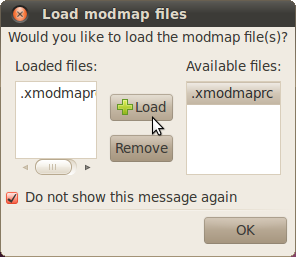
Now we know that this can be fixed so I used a bash script to call the modmap script everytime we boot. Somehow '.Xmodmap' settings are not getting loaded so I am using an alternative script '.xmodmaprc' and call it from .bashrc file manually. # .xmodmaprc xmodmap -e "add Lock = Caps_Lock" # .bashrc if [ -f ~/.xmodmaprc ]; then . ~/.xmodmaprc fi

Reboot the computer and enable the modmap file to be loaded at boot time. Enable Modmap load at book dialog PS: Kudos to dotslashblog for the xmodmaprc solution
Change Makers :: My Booklist

Few people venture out into the unknown fueled by idealism and by sheer power of their will transform the lives of many.

Over the last few weeks I started collecting the list of books by such change makers. Its amazing how many people contributed to this list. My backpacking buddy introduced me to 'Two Cups of Tea' in Thailand, I visited Cabbages & Condoms restaurant in Bangkok. The hotel owner in Nepal suggested the 'Room to read' project. Guisamel, a fellow passenger on flight over Himalayas suggested 'Schools in the clouds'. Some of the books I already read and others still on my reading list.

Popular Posts