Showing posts with label lucid. Show all posts

Wednesday, August 18, 2010

Ubuntu Netbook Remix (UNR) UI on Ubuntu 10.04 Lucid LTS

Transformed my standard Ubuntu Lucid Desktop into Ubuntu Netbook Remix (UNR) this morning. This interface allows netbook users to make better use of screen space and few great interface enhancements.

Desktop running Ubuntu UNR UI

The Ubuntu UNR wiki page gives all the information about the packages and the required steps to convert your standard ubuntu desktop to UNR interface. Don't forget to report bugs to Canonical Desktop Experience Team.

Wednesday, July 7, 2010

Orca Caps Lock Issue

Caps Lock key doesn't work is the most common complaint from Orca screen readers users. On Ubuntu 10.04 Lucid Lynx I found that Caps Lock is reset mysteriously. Here is workaround you can use until we find the culprit responsible for this.

Debugging with xmodmap

You find the present keymaps setting with xmodmap command. You can see that the line starting 'lock' is empty. We can set it properly with xmodmap -e "add Lock = Caps_Lock".


$ xmodmap 
xmodmap:  up to 4 keys per modifier, (keycodes in parentheses):

shift       Shift_L (0x32),  Shift_R (0x3e)
lock      
control     Control_L (0x25),  Control_R (0x69)
mod1        Alt_L (0x40),  Alt_R (0x6c),  Meta_L (0xcd)
mod2        Num_Lock (0x4d)
mod3      
mod4        Super_L (0x85),  Super_R (0x86),  Super_L (0xce),  Hyper_L (0xcf)
mod5        ISO_Level3_Shift (0x5c),  Mode_switch (0xcb)

# Set the Caps_Lock with xmodmap 
$ xmodmap -e "add Lock = Caps_Lock"

# Now caps lock works properly
$ xmodmap 
xmodmap:  up to 4 keys per modifier, (keycodes in parentheses):

shift       Shift_L (0x32),  Shift_R (0x3e)
lock        Caps_Lock (0x42)
control     Control_L (0x25),  Control_R (0x69)
mod1        Alt_L (0x40),  Alt_R (0x6c),  Meta_L (0xcd)
mod2        Num_Lock (0x4d)
mod3      
mod4        Super_L (0x85),  Super_R (0x86),  Super_L (0xce),  Hyper_L (0xcf)
mod5        ISO_Level3_Shift (0x5c),  Mode_switch (0xcb)

Bash Autostart script for setting Caps lock

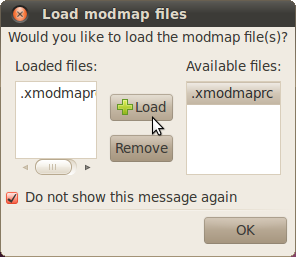
Now we know that this can be fixed so I used a bash script to call the modmap script everytime we boot. Somehow '.Xmodmap' settings are not getting loaded so I am using an alternative script '.xmodmaprc' and call it from .bashrc file manually. # .xmodmaprc xmodmap -e "add Lock = Caps_Lock" # .bashrc if [ -f ~/.xmodmaprc ]; then . ~/.xmodmaprc fi

Reboot the computer and enable the modmap file to be loaded at boot time. Enable Modmap load at book dialog PS: Kudos to dotslashblog for the xmodmaprc solution
Tuesday, March 23, 2010

Accessibility Evaluation: Yelp GNOME Help Browser

During last few months Yelp Gnome help viewer had few hiccups. The ever vigilant users quickly posted "Yelp in Ubuntu Lucid is currently not accessible" messages to various mailing-lists. I am quite happy to report that Yelp (2.29.5.x) is now fully accessible with gnome orca screen reader once again. The accessibility testing was done on Ubuntu 10.04 Lucid with Orca screen reader (2.30.0pre) and Accerciser.

You will find few accessibility and usability suggestions from the evaluation listed below. Willie Walker and Shaun McCance helped by offering sage advice on Gnome #a11y IRC channel and Gnome Bugzilla. You can track these issues by subscribing to bugs.

Yelp accessibility evaluation results screenshot with labels

Click image for full size

Please do let me know if you find more issues with Yelp. I'll promise to look at them once I return from the easter vacation.

Saturday, March 20, 2010

Dots braille editor for Linux

Dots is braille typesetting program for gnu/Linux, it can translate XML and MS DOC files and displays it both ASCII and braille dot notation. Dots is in very early stage of development and not as feature rich as commercial braille editors like WinBraille and Duxbury DBT.

The Dots braille editor is available on Debian Sid and Ubuntu Lucid, however it has loads of bugs. I patched few bugs and managed to get it working and save the translated document in .brl format. (see LP: #541721). You can view the screenshots of the program in action below.

Dots braille typesetting program import assistant dialog Dots braille typesetting program Import a file Dots braille typesetting program Translation dialog Dots braille typesetting program output format dialog Dots braille typesetting program configuration summary Dots braille typesetting program ASCII view Dots braille typesetting program Braille View

Tuesday, March 9, 2010

Skype Video Chat on Ubuntu 10.04 Lucid Lynx

Took a short break from Ubuntu accessibility work to try out the Skype 2.1.0.81 beta on Ubuntu 10.04 (Lucid Lynx).

We used the Static build of Skype client on my Ubuntu Lucid laptop, while Kaprie Kanu used Ubuntu Jaunty laptop across the room. Downloaded and extracted the compressed archive to /opt/skype-version location on both the computers.

First I faced few issues with my external web camera (see LP #502866). Starting skype with following command fixed this issue. LD_PRELOAD=/usr/lib/libv4l/v4l1compat.so /opt/skype-2.1.0.81/skype

And the results are good, text chat and Video chat works well. There is slight video distortion (green lines at the bottom of video frame). File transfers are quick and Desktop sharing, a new features in this version works out of the box.

You can use Desktop sharing for making online presentations with Ubuntu. If you need sound events from the computer to be streamed as well, unplug the headphone and use the external speakers.

skype video chat window on linux skype linux chat client window skype text chat
skype desktop sharing Skype Desktop Sharing

Thursday, March 4, 2010

Espeak Klatt voices in Ubuntu Lucid

The next version of Ubuntu 10.04 (Lucid Lynx) ships with espeak version 1.43. This new release of espeak has the klatt voices that's everyone is talking about.

In December 2009 I first read about the Klatt voices in a post on NVDA mailing list. After some initial testing, I filed a Ubuntu bug report(LP: #510182) requesting to include this version into Ubuntu. Eddie Hung build Espeak packages for testing on Ubuntu Lucid development release.

Meanwhile Luke Yelavich mentioned that we can't include unstable software releases and I wrote to espeak developer Jonathan Duddington to make a stable release just in time before the lucid code freeze. Luke and Jonathan managed resolve the technical problems, thanks to them you can now try out the espeak voice variants. Give it a try!

espeak -v 'en-us+klatt2' "This is espeak test"

Storm dargon responded to my email request to provide the steps to enable the klatt2 voice for US english. Here is how you enable them to use with orca screen reader.

cd /usr/share/espeak-data/voices/en/ cp en-us en-us.bak sudo gedit en-us #move to the end of the file press enter and type: klatt 2 #save the file and exit. Espeak will change to klatt 2 automatically.

Someone once commented "espeak voice sounds like a 1960's science fiction robot" and I think its true. Right now we should work to make them better, Interested Anyone?

Popular Posts