Showing posts with label Nokia. Show all posts

Friday, December 31, 2010

SIM Card Registration Failed Solution

Few days ago I sent a message on twitter "Anyone know the reason for Nokia's SIM Card Registration Failed problem?". Got quite a few solutions from my friends . It is the most common problem with Nokia mobile phones. Restarting the phone few times or removing SIM and cleaning the contacts also fixes the problem. Try some of the solutions that worked for me.

Solution 1: Blocked SIM or Faulty SIM

In countries like India, you need to register your SIM card. The cell phone company blocks the SIM if they don't receive the application within few weeks of activating the phone. Please check if this is case.

Take out the SIM and test it with a different phone, if the phone fails to read the SIM, get the SIM replaced. Few days ago this worked for a friend with a brand new Nokia handset here in Hanoi, Vietnam.

Solution 2: Clean SIM Contact Pins

Take out the battery and SIM card. Use a clean eraser to wipe the gold contacts of the phone and on back the SIM card. Replace the SIM and make sure its firmly held in place. Few phones tend to start to working when you bang them on your palm a few times due to this reason. Tighten the tiny screws on the back panel of the phone near the SIM card if they are loose.

Solution 3: Phone Software/Hardware Issues

Despite all your efforts, the phone refuses to work then try to the phone repaired or replaced. Some users found that the cellphone firmware upgrade tends to fix this issue. I got a Nokia phone firmware upgraded, it fixed the problem for few months. But the phone started to have the problem again.

Unfortunately there seems to be no sure fix for this problem. Most cell phone service centers including Nokia Authorized shops often fails fix this annoyance. They even charge you service fee just for checking the phone :( .

I would love to hear your experiences, have you had this problem? Did you manage to fix it. Thank you ajuonline, BasilKurian, geohacker for your suggestions.

Wednesday, October 6, 2010

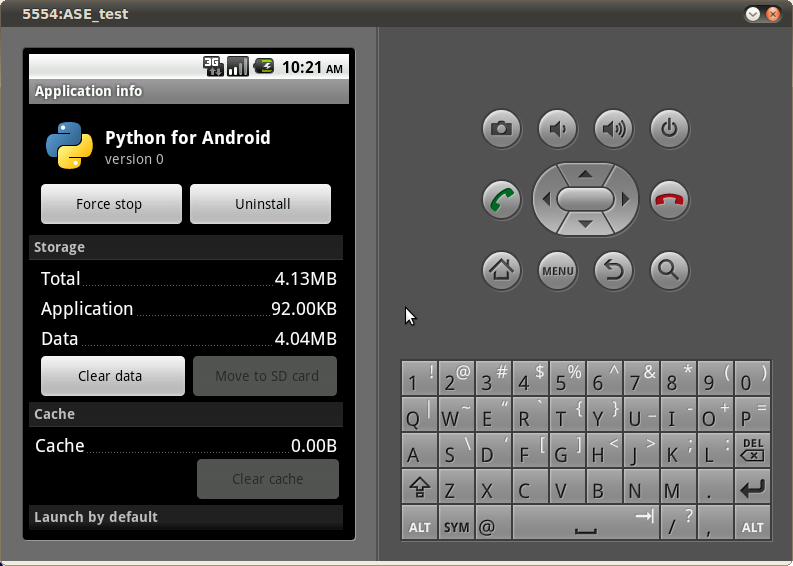
Installing Python on Android

Had left the Openmoko Linux phone and aging Nokia N70 back in India. Now I travel with a basic model phone, do miss hacking phone.

This morning I decided to change all that. Checking out Python Scripting Layer For Android using the Android SDK. My Nokia also ran Python S60 until the project lost wind. Getting the android environment on Ubuntu was easy thanks to Eric's tutorial


Sunday, August 9, 2009

Hack a Mobile Phone with Ubuntu Linux and Python for S60

Nokia N70

Managed to breath life back into my old hand-me-down Nokia N70. The phone was having White Screen of Death (WSOD) one too many, a new display IC fixed that. The original nokia battery (Nokia BL-5C) started to swell and needed to be replace.

Now the old war horse is battle ready, let me hook it up to my laptop via a bluetooth link and do something useful with Python on S60 series.


$ hciconfig reset 
hci0: Type: USB
 BD Address: 00:21:86:A8:BF:03 ACL MTU: 310:10 SCO MTU: 64:8
 UP RUNNING PSCAN ISCAN 
 RX bytes:1260 acl:0 sco:0 events:34 errors:0

$ hcitool dev 
Devices:
 hci0 00:21:86:A8:BF:03

$ sdptool add --channel=2 SP 
Serial Port service registered

# Now make sure the Python bluetooth console is running

$ rfcomm listen rfcomm2 2 

In your phone, make sure bluetooth is on, then go to the Python application and then select the Bluetooth Console. Select from the list of available devices your computer's bluetooth adapter (you might need to select search even if you think you have already defined the pairing). If the operation is successful, you should see something similar to the following on your computer's shell:

    * Waiting for connection on channel 2
    * Connection from 00:11:9F:BE:47:CA to /dev/rfcomm2
    * Press CTRL-C for hangup 

# Change to different terminal and connect to the device with screen. 
$ screen /dev/rfcomm2

# Run basic tests.

print u"hello"
hello
>>>
>>> import appuifw
>>> appuifw.note(u"hello world")
>>>

This Python S60 Bluetooth Console wiki page provides more step by step intrusions of the whole process.

Wednesday, December 3, 2008

Commwarrior Virus on Nokia N70

Nokia N70 My Nokia N70 was infected by Commwarrior worm during my stay in Bangalore. I always keep my Bluetooth connectivity disabled but the worm must have crept in via Multimedia Messaging System (MMS) or perhaps the memory card (RS-MMC) I picked up recently was already infected.

I tried to contain the worm right away by removing the GPRS/Data Access Points information and changing the phone Line In Use to line 2. The wor, would try to send MMS messages out and start the browser to connect to remote servers with .ru (Russia) domains, since both of them were blocked it started to crash and reboot every few minutes. Here is detailed steps to remove the commwarrior worm from your smart phone.

How to remove Commwarrior Worm From Nokia N70

F-Commwarrior - Tool to deactivate the worm:Download
Disinfection:

  1. Download F-Commwarrior and transfer .sis file to phone(I used obexftp client to transfer .sis to phone)
  2. Click f-commwarrior.sis file to install the application
  3. Make sure that you have all applications closed
  4. Open F-Commwarrior application and select "Deactivate Commwarrior" from menu
  5. If Commwarrior is found phone boots immediately after disinfection
  6. Install F-Secure Mobile Anti-Virus to finish cleaning up your phone

Popular Posts