Showing posts with label Mobile. Show all posts

Monday, October 23, 2017

Upgrading LG G3 Mobile Phone to Android Mashmallow (6.0)

Recently I brought a used Korean version LG G3 mobile phone for a Virtual Reality (VR) project. The mobile phone required update to the latest version of Android operating system. This Korean model of LG G3 didn't offer Over the Air (OTA) updates.

The first step in the update process is to connect the model phone to the computer using USB cable. However the standard Android 'Google USB Drivers' didn't work. After some searching I found that LG Universal Mobile Drivers from LG support site.

Next I used the LG Mobile Support Tool program on my computer to start updates. This model is not supported by LG Bridge Software. After couple of updates I managed to upgrade the mobile phone to Android 6.0 Marshmellow. Each update requires a download of 1GB update and you need to wait for the phone to reboot and optimize all the Android applications.

There was one glitch in the upgrade. Had to restart an upgrade when I faced 'Upgrade stopped due to an error' message.

Here rather straight forward way to upgrade the phone to latest Android 6.0 (Marshmellow):

Wednesday, July 29, 2015

Autonomous Mozilla Stumbler with Android

Mozilla Location Service (MLS) is an open source service to determine location based on network infrastructure like WiFi access points and cell towers. The project has released an client applications to collect the large dataset of GSM, Cellphone, WiFi data using crowd sourcing. In this blog post I'll explore an idea to re-purpose an old Android mobile phone as an autonomous MozStumbling device that could be easily deployed in public transport, taxis or your friend who is driving across the country.

Bill of Materials

  1. Android Mobile phone.
  2. Mozstumbler Android App.
  3. Taskbomb Android App.
  4. Mini-USB cable.
  5. GSM SIM (With mobile data).
  6. Car lighter socket power adapter.
  7. Powerbank (optional).

Putting it together

In this setup, I am using a rugged Android phone running Android Gingerbread. It can take a lot punishment. Leaving a phone in overheated car is recipe for disaster.

From the Android settings I enabled allow installation of non-market applications 'Unknown Sources'. Connected the phone to my computer using the Mini-USB cable. Transferred the previous downloaded apps(.apk) packages to phone and installed the Mozstumbler and Taskbomb applications.

Android homescreen showing Mozstumbler and Taskbomb icons

Configured the Mozstumbler application to start on boot with Taskbomb app. Also configured Mozstumbler to upload using mobile data connection. The phone has GSM SIM card with data connection. Made sure both WiFi, GPS and Cellular data is enabled.

To prevent phone from downloading software updates and using up all the data. I disabled all software updates. Disabled all notifications both audio and LED notifications. Finally locked by phone by setting a secret code. Now the device is ready for deployment. The phone is plugged into car's lighter charging unit to keep it powered up. You can also use a power bank in case where charging options are not available.

Planning to use this autonomous Mozstumbler hack soon. Perhaps I should ask Thejesh to use on his epic trip across India.

Saturday, July 25, 2015

Restoring Nexus 4 Factory Image

Something terribly went wrong during Android 5.1.1 Over The Air (OTA) update. The Nexus 4 mobile phone stuck in the boot loop after update. Perhaps the update failed to download the files or the device ran out of disk space. For those of you who like to debug such problems, I captured some logs for analysis with 'adb logcat' here (1,2,3,4).

Caution: Flashing a new factory image deletes all user data. Be certain to first backup any personal data such as photos.

Tools: What do you need to restore the phone?

For this tutorial I'll use a gnu/Linux computer with Android SDK Stand-alone Tools installed. We'll use the 'fastboot' program to flash the Android Nexus 4 devices with factory images from developer.android.com/nexus/images.

  1. Download Android SDK Stand-alone tools from developer.android.com.
  2. Uncompress the Android SDK to your /opt/android-sdk-linux directory.
  3. Add Fastboot to your system path
    
    $ ln -sf /opt/android-sdk-linux/platform-tools/fastboot /usr/local/bin/fastboot
    
  4. To get Fastboot working on gnu/Linux I added the follow line to /etc/udev/rules.d/51-android.rules .
    
    $ sudo nano /etc/udev/rules.d/51-android.rules 
    
    # adb protocol on mako (Nexus 4 debug)
    SUBSYSTEMS=="usb", ATTRS{idVendor}=="18d1",ATTR{idProduct}=="4ee2", MODE="$
    
  5. Restart udev service.Connect the Nexus 4 device to computer with USB cable and see fastboot can access it.
    
    $ sudo service udev restart 
    $ sudo fastboot devices
    
  6. Unlock the Nexus 4 phone (Optional step). The phone will reboot and follow the instructions on the phone screen to unlock the phone.
  7. $ fastboot oem unlock 
  8. Let's put the Nexus 4 in recovery mode so that we can flash the new factory image. You can use 'adb' command or press hold volume up + volume down + power buttons during the phone bootup.
      
    $ adb reboot bootloader
    
  9. Download the Nexus 4 factory image from developers.google.com/android/nexus/images. I have downloaded the Android 5.1.0 (LMY47O) factory image. Uncompress it the downloaded file and excute the 'flash-all.sh' script to flash the factory image.
    
    $ tar zxvf occam-lmy47o-factory-cae68e81.tgz 
    
    $ cd occam-lmy47o/ 
    
    $ sudo ./flash-all.sh 
    

Whew! That's all folks! Now you get enjoy the Nexus device with brand new factory image.

Saturday, May 16, 2015

Fixing Nexus "Red light of death"

Encountered the LG Nexus "Red light of death" problem this morning. The battery had completely discharged itself, trying to charge with power adapter didn't work. Instead of familiar charging animation, the phone had a tiny red light. Web searches suggested to remove the battery and charging it, the process similar to charging a dead car battery using jumper cables. The LG Nexus mobile phone has an internal battery and removing it takes bit of work.

Fortunately I found this forum post that provided a simple solution.

Guys this is complete overkill. There is a documented process for fixing the red light of death. Basically you need to do a battery pull and then let it charge for awhile. HOWEVER, there is a way of simulating a battery pull without actually doing it:
  1. Unplug phone from charger
  2. Press and hold the volume UP button plus power button for 60 seconds.
  3. Release buttons.
  4. Plug into charger.
  5. Wait about an hour for it to charge.
That's it. This is a documented and published fix from LG and Google. The pressing of the buttons does something to simulate a battery pull - probably some sort of flushing of any remaining current out of the phone or tripping some sort of e-fuse like feature.

That fixed the 'Red light of death' problem for me. Hope this helps for you too!


Wednesday, October 22, 2014

3D scanning with mobile phone

You got a 3D scanner in your pocket right now. It's your mobile phone. The innovative 123D Catch application let's you turn ordinary photos into 3D models. You can edit these 3D models and print it with a 3D printer. The 123D Catch is available for iPhone, Android, Windows PC and web app (Works only in Google Chrome).


Go forth and 3D capture the world around you.


Troubleshooting

Looks the services was down during the weekend. Login page spewed the following error. Now the service is back online.


{"CODE":100,"STATUS":500,"MESSAGE":"Internal server error | URL Parameters:afc=PA1ON1&locale=en-US&ssl=true&relative_redirect_path=/login-redirect","DATA":{},"ERROR_ID":"175e100e-e932-4e37-81aa-bab52ec0ae5c"}


Friday, October 3, 2014

Micro SIM card adapter

Eating your own dog food or Dogfooding in technical parlance means the software maker uses their own software thus appreciate its strengths and weaknesses (and hopefully improve on those.)

Usually I dogfood multiple mobile phones running early releases of Cyanogenmod and Firefox OS. Doing this is easy when you have multiple SIM cards. But if you have to swap your SIM card between Nexus 4 (micro-SIM) and Firefox OS device (mini-SIM) then you'll love this inexpensive Nano SIM adapter from NooSY.


Sunday, December 29, 2013

Drone Technology in Social Projects

Amazon plans to use drones for making deliveries. They are not the first to use drones for transport of materials. Oppikoppi music festival attendees can order a beer using a mobile phone app. The DarkWing Beer Drone use the mobile phones GPS location to drop a beer straight into their hands or mostly onto their heads. Made this video of the beer drone demo at Tech4Africa 2013.


The unmanned aerial vehicle (UAV) commonly referred as drone will be more prevalent in the future.The United Nations (UN) is deploying drones in Congo. The cost of this technology is still prohibitively high. But social projects such ConservationDrones.org are trying to bring down the cost by using Open Hardware and Open Source Software. They are already using drones for field surveys in Indonesia. You can learn more about Conservation Drones here.


Do you know of any interesting use of Drones in social projects. Please do share it by leaving a comment below.

Sunday, December 15, 2013

Joby GripTight tripod mount for Smart Phones

Continuing my blog series about interesting accessories for your smartphone. Did you ever want to make shake-free photographs and videos with your smartphone. The $20 Joby GripTight Mount connects your smartphone onto any tripod to provide a stable shooting platform. You can also use the smartphone headphone button as cable release. This gadget is great for smartphone photographers and video bloggers. To learn more watch GripTight mount videos on YouTube.


If don't own a tripod, then try to buy GripTight Gorillapod Stand. They make wonderful Christmas gifts too.

Wednesday, December 11, 2013

Turn your old iPod speakers into wireless speakers

Do you have one of these portable iPod speakers in your home. In this post I'll shared an idea that lets you play music straight from iPhone or Android device. You can pick up this $25 GTI Bluetooth Adapter from Frys. The device plugs into iPod connector on your portable speakers and receives music via Bluetooth A2DP. Similar Bluetooth receivers that connect to aux-in ports are also available.

ipod sound dock front view

The idea emerged while helping a friend re-design hotel rooms for tech savvy business travelers. Found these inexpensive Bluetooth A2DP receivers to reuse the existing iPod dockable clock speakers in the hotel rooms. Perhaps NFC is a better choice but right now there only few mobile phones with NFC support.


Saturday, August 17, 2013

Micro USB Host Mode OTG Cable for Samsung Mobile Phones

In this blog I talk about technology world as built. Android phones are most selling smart phones all over the world. These phones and tablets are increasingly used for watching videos and listening to music. Transferring multimedia content on to your device is painful. The software tools made by phone vendors such as Samsung Kies have problems. Android MTP and Bluetooth software leaves a lot to be desired, making large transfers fail intermitingly. Developers like me use command-line MTP tools or use Android SDK's ADB program for transferring files.

For everyone I suggest buying a OTG cable that makes life easier. This cable allows you to connect USB devices to your phone and transfer files with ease. I brought this OTG cable in Hong Kong for $15 HKD (about US $2). Tested this cable with Samsung Galaxy S2 mobile phones running Android Gingerbread and Jellybean with couple of 8GB USB drives.

Photo of Samsung OTG micro USB cable box

You might need to install a file browser like ES File Explorer File Manager app on your phone to easily navigate to attached USB device and copy files to internal memory. You can watch the video of below.

You can pick this OTG cable in your local computer store or order one from Deal Extreme (dx.com). For more other interesting Samsung phone accessories have a look at Samsung Galaxy S2 Accessories For Presentations post.

Wednesday, July 10, 2013

Winning Djangojet Photo Contest

Summer sun shines on the green meadow full of dandelions and the huge Djangocon circus tent. The fantastic setting of this conference had one flaw. The roar of airplanes from the nearby airport overhead.

The ever creative conference organizers announced a photography contest dubbed 'Djangojet'. The contest required us to capture the picture of Jet planes and share it on instagram with #djangojet hashtag. My photograph bagged the prize.

Djangojet Photo Contest Winner

I took this picture with Samsung Galaxy S2 smart phone while waiting in line for lunch. It captures the people enjoying the sunny day around the Django circus and the airplane in the bright blue sky.

You don't need fancy camera to take a good picture, your smart camera phone can do the job well. The composition and the story makes a good photograph.

Tuesday, May 14, 2013

Android Device Offline: Fixing ADB Connection Error

After upgrading to Android Jellybean (4.2.2) the 'adb (Android Debug Bridge)' program failed to connect my Android mobile phone. Running 'adb devices' in the terminal showed error: device offline message.

Recently Android switched to MTP (Media Transfer Protocol). Unfortunately MTP support has some issues. For now I have to resort to using 'adb' command to work with my Android mobile phone.

Digging around the Internet, I learned that Android Jellybean has a new security feature. You need to do RSA key fingerprint verification with the PC. Otherwise the Android device will be reported as offline.

How to Fix ADB Device Offline Error

Here are the steps to connect to your Android device with adb.

  • Get the latest version of adb. Update using Android SDK android program: 'android update adb'
  • Restart adb server with 'adb kill-server'
  • Unplug and reconnect the device to a different USB port
  • Repeat last two steps until you see 'Allow USB Debugging?' dialog on your android device.
  • Select 'Always allow from this computer' option

Now you can talk to your Android device using the adb commands.

Sunday, May 5, 2013

Install CyanogenMod 10.1 (Android Jellybean 4.2.2) on Samsung Galaxy S2 (GT-I9100G)

In this post we'll install Cyanogenmod CM 10.1.x on Samsung Galaxy SII mobile phone. Please note this instructions apply to Samsung Galaxy S2 GT-I1900G model only.

Disclaimer: Installing third-party firmware will void your phone warranty and if something goes wrong it could make your phone unusable. The installation process will wipe data/apps, Please backup everything.!

Before you get started consider backing up your phone data using Samsung Kies or Android apps such as Titanium Backup. Alternatively you can copy the data manually by connecting the phone to your computer with an USB cable.

Prerequisites: What do you need?

  1. Install Android SDK. We'll use the nifty adb program to manage the phone and debug any problems.
  2. Install phone flashing program Fastboot, Heimdall on Linux or Odin utility for MS Windows.
  3. Download Clockwork Recovery: GT-I1900G_ICS_ClockworkMod-Recovery_5.5.0.4.tar
  4. Download latest Cyanogenmod 10.1.x from Cynogenmod download page for i9100g device..
  5. Download gapps-jb-2013301-signed.zip from goo.im.This package provides standard Google Android applications such as Google Play (A.K.A Google Market).
  6. If you are upgrading an Android Gingerbread Phone, you'll need stock Android Ice Cream Sandwich(ICS) ROM. You can find stock Android ROM from SamMobile.

Flash Ice Cream Sandwitch (ICS) Official ROM to Samsung Galaxy S2(GT-I9100G)

You'll need your phone to running Android Ice Cream Sandwitch(ICS). The phone needs to run ICS bootloaders to upgrade to CyanogenMod 10.1.x. In this section I'll flash official Ice Cream Sandwitch(ICS) ROM onto my Gingerbread Phone.(Thank you codeworkx for pointing this out.)

You can ignore this section if you are working with ICS S2 phone.

  1. Unzip the previously downloaded ICS ROM I9100GDZKL3_I9100GOLCKL3_XME ROM
  2. Put the phone in download mode by holding Volume Down(-), Home button and pressing power button.
  3. Connect the phone to computer using USB cable
  4. Launch 0din on your computer and select PDA mode and flash the uncompressed .tar file.
  5. Once complete the phone will reboot.

Root the Samsung S2 ICS Phone with ClockWorkMod Recovery Kernel

The handy ClockWorkMod tool allows you to flash the phone with different ROMs from the phone itself without the need
of computer.

  1. Connect your phone to computer using a USB cable.
  2. Put the device in download mode with 'adb reboot bootloader' or by holding Volume Down(-), Home button and pressing power button.
  3. Uncompress the previously downloaded Clockwork Recovery file.
  4. Use heimdall program to flash on the command line: 'heimdall flash --kernel zImage'
  5. Reboot the mobile phone.

Install CM 10.1.x on Samsung Galaxy S2

Connect your phone to your computer and transfer the previously downloaded files Cyanogenmod 10.1.x and Gapps files to mobile phones internal memory. Restart the phone and enter recovery mode by pressing Volume Up, Home and Power buttons together. Follow the steps below to install the CM10.1.x on your phone.

  1. Select wipe data/factory reset
  2. Select wipe cache partition
  3. Select Advanced Menu and choose wipe dalvik cache
  4. Select Install zip from sdcard and choose update-cm-10.1-XXX-XXX-XXX-signed.zip file.
  5. Select Install zip from sdcard and choose gapps-jb-2013301-signed.zip file. Reboot phone

That's all folks! Don't forget to share your experiences by leaving a comment here.

Tuesday, April 30, 2013

Barcamp Yangon 2013

Whoever said "Change is slow" hasn't been to Myanmar (also known as Burma). In seven short months, the country transformed into the something I now barely recognize. Getting Myanmar visa never been this easy, many direct flights to Yangon from all international hubs in South East Asia everyday. The Yangon airport is chocked with tourists, the prices just went through the roof. This time I didn't bring any crisp, unmarked hundred dollar notes to haggle for better exchange rate with the punters on the Yangon streets.

Walking out of the airport, I realized Myanmar has switched to driving on left side of the road. The roads are clogged with second-hand Japanese minivans, imported SUV's and decades old taxis jostling for space. For a moment, I longed for the small colorful Mandalay jeeps plying the quiet Yangon streets at sedate pace. Stuck in the traffic jam, I killed time by counting different cars with left and right steering wheels.

If you get stuck in the traffic jam, you can use the 3G mobile network to catch up with your email. Mobile SIM cards doesn't cost US$2000 anymore. Mobile SIM cards with data plan can be rented for $10 a day. If you are lucky you might even find $20 voice only tourist SIM cards. Mobile connections are still very expensive, it costs US$150-$200 for mobile connection. Perhaps it might soon change when the telecommunications market opens up in next few years.

Back in Myanmar after two years for Barcamp Yangon 2013, the biggest community organized un-conference in the world. This year over 6000 participants are expected to attend this event. Barcamps are hugely popular in this country, the event addresses the digital divide with open sharing and even help kick-start technology entrepreneurship activities.

Few years ago, young students would attend to use the free wireless internet access at Barcamp Yangon. Internet access was restricted to educational institutions and Internet Cafes. Today you can get internet connection in restaurants, cafes and even at home. It is easy to buy personal computers, smart phones and tablets locally. There will be explosive growth of internet users in Myanmar.

During Barcamp Yangon 2011 I kick-started the effort to translate Firefox web browser into Burmese. I have been mentoring the local Mozilla Myanmar community ever since. It had been a long road, we had many problems: building Mozilla community, finding volunteers for translations and deploying right web based localization tools. This trip to Myanmar would give me a chance to work with the community and resolve translation issues that are blocking Firefox Burmese release.

Barcamp Yangon 2013

Once again the barcamp organizers and volunteers efficiently organized such a large event. The event attracted significant
sponsorship this year, the talks in main rooms were marketing pitches from those sponsors. There were some interesting talks 'Make the web speak your language' and 'Women in technology' panel discussion. It was good to see many international participants at the event, they were in Myanmar on vacation and decided to attend the event. The Q&A session with the international barcampers was a good experience, it provided an opportunity for young Burmese barcampers to interact and get perspective on wide ranging subjects.
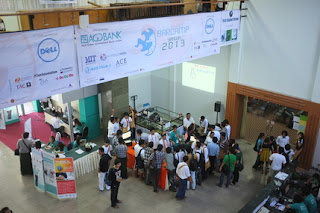
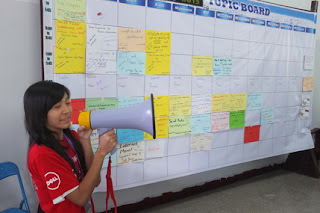
Barcamp Yangon Venue
Barcamp yangon Tech Talks
Make the web speak your language

In my talk How to become a Firefox Hacker I shared how one can leverage existing web development skills to contribute to Firefox. Mozilla Myanmar localization lead contributor Zinmin shared the Firefox localization process and gave a demo of Pootle web based translation tool. The participants were encouraged to join the Mozilla Myanmar community and localization sprint after the Barcamp Yangon.

Mozilla Myanmar localization demo by zinmin

Attending Barcamp Yangon gave me a good opportunity to keep the pulse the fast changing Myanmar. It was good to reconnect with the open source communities and meet people in technology and non-profit world. Next year I hope to attend Barcamp Mandalay, it seems to have more developer focused audience.

Ubuntu Myanmar Community

Mozilla Myanmar Localization Sprint

After Barcamp Yangon, Zinmin organized Burmese localization sprint in Yangon. The localization sprint provides hands-on training for new localizers. After a quick introduction from Zinmin and the team started translating remaining strings Firefox Aurora. The Pootle web based tool does perform well bandwidth constrained environment such as Myanmar. Zinmin cleaned up most of the translation errors that were blocking the productization of Firefox Burmese Aurora.

During the sprint, Sajal and I spent some time testing Firefox Mobile. Firefox Mobile is important in countries like Myanmar where there is a large growing mobile web users than desktop users. However due to economic sanctions Google Playstore is not available in this country. Burmese users resort to various alternative app stores to find apps for Android devices. Another problem is network latency, for instance, tweeting pictures was really difficult. We looked in how to test Android apps network latency and performance issues.

You can read more about Mozilla L10N sprint on Zinmin's blog post in Burmese and the download the latest Firefox Burmese Aurora here.

Technology Entrepreneurship and Start ups in Myanmar

Spent some time meeting various technology entrepreneurs in Yangon. Start-up incubators like Rocket Internet and few others opened shop in Myanmar. Expats and Burmese diaspora are returning to start technology start-ups. Along with opportunities from the burgeoning economy there are challenges: People with good technical skills are hard to come by, the overhead costs are really high due to inflated prices.

I hope you'll get a chance to visit Myanmar and experience its rich culture. Perhaps you might wanna join the
Barcamp Yangon next year or spend some time working I'll help you find a co-working space in Yangon.

Saturday, February 2, 2013

Using Firefox Remote Debugger with Firefox OS Simulator

Firefox OS App developers can use Firefox Remote Debugger to quickly fix web app bugs. In this screencast Jeff Griffiths shows the current workflow of using the Firefox OS simulator and the Firefox Nightly remote debugger developer tool.


Don't see the embedded video, you can watch it on YouTube.

You can also use Firefox Remote Debugger with Firefox OS running in a desktop emulator, on a Firefox OS device and Firefox Mobile on Android mobile phone. Head over to Mozilla Developer Network (MDN) to learn more about Firefox Remote Debugging.

Monday, January 28, 2013

Speeding Up Software Rebuilds with CCache

Software developers who routinely rebuild large projects would love ccache. Ccache is a compiler cache. It speeds up software rebuilds by caching the result of previous compilations and detecting when the same compilation is being done again.

I use ccache when compiling Linux kernel, Debian/Ubuntu packages, GNOME applications, Mozilla Firefox, FirefoxOS and Android operating system. You could enable ccache by prefixing ccache to your compilation command or update your system path to include ccache.


# Add the following line to your ~/.bashrc file 
export PATH=/usr/lib/ccache:${PATH}

Alternatively you could create symlinks in ~/bin directory. GNOME 3 jhbuild documentation provides a bash script for this purpose.


cd ~/bin
for cmd in cc gcc c++ g++; do
  ln -s /usr/bin/ccache $cmd
done

To take advantage of ccache while building Mozilla Firefox, append the following line to your .mozconfig.


ac_add_options --with-ccache

If you are compiling Android(ASOP), CyanogenMod or Firefox OS. Android build system includes the ccache program, set the USE_CCACHE environment variable to enable ccache.

$ export USE_CCACHE=1

Further more in-depth information, read the ccache manual page. Please do comment and share your experiences using CCache.


Sunday, December 16, 2012

Barcamp Phnom Penh 5

Last year we kick-started Mozilla Firefox Aurora Khmer localization effort at Barcamp Phnom Penh 4. Now a year later, Thanks to efforts of Mozilla Khmer L10N team and invaluable support of several people from various organizations. We have a successful release of Firefox Khmer.

Barcamp Phnom Penh is community organized two day un-conference held in the capital city of Cambodia. Walking around Barcamp Phnom Penh at University of Puthisastra in central Phnom Penh, you'll encounter young Cambodian's engaging in social media on latest smart phones and tablets everywhere. There are numerous booths advertising smart phones, right next English language schools, Media and NGO organizations.

At Barcamp Phnom Penh 5 this year there was marked improvement in quality of talks. The technology related talks were really in-depth and encouraged participation from audience. Cambodia has good English language penetration, learning English ensures better livelihood. In country where 50% of population live below the poverty line, the Cambodian youth have an insatiable thirst for learning and making a better life. This spirit attracts me to Cambodia time and again.

Firefox Khmer, FirefoxOS and Web API

On the first day of Barcamp Phnom Penh, I talked Mozilla mission and future of Web, As a platform. The demo of development version of FirefoxOS phone was well received.

The next day Vannak ENG talked about the about Mozilla localization and walked the audience through various steps of translating Firefox. It was great to see people hanging out after the talk to interact with Vannak. Such interactions help us build a good contributor community and help keep the Firefox translations update-to-date every 6 weeks

Mozilla Khmer L10N demo

At the end of Barcamp Phnom Penh, I gave lightening talk titled '6 kick-ass things you can do with your browser'. The talk provided a whirlwind tour of Mozilla Web API and their status.

Khmer Language support in Firefox Mobile on Android 4.1 (Jelly Bean)

I met Danh Hong, the creator Khmer Web Fonts and we talked about the font rendering issues in Firefox Mobile(Bug 793474) running on Android Jelly Bean (4.x). These issues are now resolved in new HarfBuzz update (Bug 780409)

Mozilla Firefox Mobile showing Khmer page

Few other issues in Khmer language support remain. Android Jelly Bean (4.1) supports Khmer rendering well, but Khmer fonts are not shipped with Android. You need to use third party app to install them.

On Desktop computers, though high quality Khmer fonts are available for various operating systems. There is lack of proper documentation about the installation process and the license are not very clear.


Upcoming Barcamps in Cambodia

The barcamp camp team deserves a pat on the back for organizing yet another fantastic event. Next year they are organizing five Barcamps all over Cambodia.

Perhaps I'll try organize a hands-on workshop on web technologies at Hacker Space Phnom Penh or Small World Phnom Penh. If you are interested, get in touch with me.


Wednesday, May 2, 2012

ClockworkMod (CWM) Recovery Backup and Restore Android Phone Firmware

In my last post, I introduced ClockworkMod (CWM) Recovery to backup your phone firmware. It is a good idea to copy these backup files to your computer for safe keeping.

You will find the ClockworkMod(CWM) Recovery firmware backups in this location on your phones internal memory.


/sdcard/clockworkmod/backup

You'll need Dobrica Pavlinušić's shell script to copy the ClockworkMod(CWM) Recovery backups to your computer. For some unknown path related issue the standard Unix 'cp' will not work. You won't be able to copy these backup files to your computer, however you can copy files from computer to phone without any problem.

#!/bin/sh -x

sdcard=/sdcard/clockworkmod/

adb shell ls -1 -d $sdcard/backup/* | sed "s!$sdcard/*!!" | tr -d '\r' > /tmp/backup.android
ls -1 -d backup/* > /tmp/backup.disk
diff -uw /tmp/backup.android /tmp/backup.disk | grep -- '^-backup' | sed 's/^-//' | \
xargs -i sh -xc "mkdir -p {} && adb pull $sdcard/{} {}"


To restore your phone firmware from your backups. Copy the ClockworkMod(CWM) Recovery files to the backup directory on the phone. Reboot the phone into recovery mode and use the Backup / Restore option to restore the firm.


Lately, I use this technique to deploy Boot2Gecko quickly onto compatible phones when the Boot2Gecko builds breaks. The new B2GBuilds.org project started nightly build of Boot2Gecko, you might want to check it out. Personally I would prefer the B2GBuilds.org project builds Cyanogenmod style otapackages instead. Support for this is coming soon, watch this space.

Friday, April 27, 2012

Install Android 4.0 Cyanogenmod 9 Firmware on Galaxy S2 Phone


There is lot of information on Internet about Cyanogenmod, after-market mobile phone firmware installation. However some of this information incomplete and misleading. My first attempt to install Cyanogenmod 9 phone failed. The phone screen played the booting animation in an endless loop. Let me share my installation notes here, this might save you from pulling your hair or worse chucking the phone out of the window.
Disclaimer: Installing third-party firmware will void your phone warranty and if something goes wrong it could make your phone unusable. The installation process will wipe data/apps, Please backup everything.!
Before you get started consider backing up your phone data using Samsung Kies or Android apps such as Titanium Backup. Alternatively you can copy the data manually by connecting the phone to your computer with an USB cable.

Prerequisites: What do you need?


  1. Install Android SDK. We'll use the nifty adb program to manage the phone and debug any problems.
  2. Install phone flashing program, Heimdall on Linux or Odin utility for Windows OS.
  3. Download Clockwork Recovery recovery-clockwork-4.0.1.4-galaxys2.tar. (Please use GT-I9100G_ClockworkMod-Recovery-5.0.2.8.tar file for Samsung Galaxy S2 GT-I1900G phones.)
  4. Download latest Cyanogenmod9 from Cynogenmod download page.
  5. Download gapps-ics-20120422 from goo.im.This package provides standard Google Android applications such as Google Play (A.K.A Google Market).

Installing Clockworkmod(CWM) Recovery

This is an essential tool for our work. The Clockwork Recovery is modified version of the kernel that provides advanced features such as backup/restore phone ROM's and installing Cynogenmod updates. If you plan to dual boot your phone with different Android versions or Mozilla's Boot2Gecko.
The first step to flash ClockworkMod (CWM) onto your phone using heimdall or 0din program.
Unzip recovery-clockwork-4.0.1.4-galaxys2.tar archive and flash it with heimdall command line flashing utility for Samsung phones.


# Download clockworkmod 
$ wget http://cmw.22aaf3.com/c1/recovery/recovery-clockwork-4.0.1.4-galaxys2.tar

# Unzip it 
$ unzip recovery-clockwork-4.0.1.4-galaxys2.tar


#Connect and reboot the phone into download mode with:
$ adb reboot download

heimdall flash --kernel zImage


Please wait for the phone to reboot. If it doesn't work the first time, try again.
Now you can boot into the recovery mode by pressing Volume Up, Home and Power buttons together until Galaxy S2 logo appears on the phone screen. You can navigation the recovery mode screen by using volume up and volume down keys and power button to select an option.

Backup your Phones original ROM

Restart the phone and enter recovery mode. Select Backup/Restore menu and choose Backup. This provide a safety net, you can always restore the original ROM in case the Cyanogenmod 9 installation fails.

Installing CyanogenMod9 Android 4.0 Ice Cream Sandwich(ICS) on Samsung Galaxy S2

Connect your phone to your computer and transfer the previously downloaded files Cyanogenmod 9 and Gapps files. Restart the phone and enter recovery mode by pressing Volume Up, Home and Power buttons together. Follow the steps below to install the Android ICS on your phone.

  1. Select wipe data/factory reset
  2. Select wipe cache partition
  3. Select Advanced Menu and choose wipe dalvik cache
  4. Select Install zip from sdcard and choose update-cm-9-XXX-XXX-XXX-signed.zip file.
  5. Select Install zip from sdcard and choose gapps-ics-2012XXXX-signed.zip file. Reboot phone

That's all folks! Don't forget to share your experiences by leaving a comment here.

Wednesday, March 14, 2012

How to Fix Samsung Kies connection problem

Update (Aug 17,2013): Testing Samsung Kies on MS Windows 7. The Samsung Kies connects after a while or only intermittently. Please see the comments below for possible solutions.

Samsung mobile phone users are familiar with this error. Kies is a personal computer sync software that enables you manage your Samsung phone, similar to iTunes software for Apple iPhones. Samsung Kies software refuses to connect your device and gives this cryptic message.

Reconnect the device in Samsung Kies (PC Studio) mode. Current connection Mode not supported by Kies

Spent an hour raking my brains, then the obvious solution presented itself. Turn off USB Debugging Mode. You will find this setting under Settings > Applications > Development.

Visual Guide to Android USB Development Settings

Samsung Kies software uses MTP (Media Transfer Protocol) mode to talk to your Android device. Enabling USB debugging setting changes your android device to use USB transfer mode.

Popular Posts