Showing posts with label XO Laptop. Show all posts

Thursday, February 20, 2014

Sugar Learning Platform

Last weekend I attended the Vietnam Tech Conference 2014 in Hanoi. The event brought together educators from across south east asia to learn and share about the use of technology within the classroom.

My talk introduced the Sugar learning platform that was developed for OLPC laptops. Designed from the ground up especially for children. Sugar User Interfaces moves away from traditional 'desktop' metaphor. It makes collaborative learning a fun experience. There are numerous activities that promotes self-learning.


What is Sugar on a stick?

Sugar on a Stick is a Fedora® Spin Live USB operating system featuring the award-winning Sugar Learning Platform and designed to fit on an ordinary USB thumbdrive ("stick").

It will run on any recent x86-based computer that can boot from a USB stick (check the BIOS settings if it doesn't work straight away). This includes most Windows and Linux PCs and x86 Macs.

You can use SoaS to demo Sugar almost anywhere without disturbing the contents of the computer you use, and if people like what they see, you can install Sugar on a Stick to their hard drives or other sticks from the demo stick.

Learn more about Sugar on a stick here.

Sunday, January 5, 2014

Using Sugar Learning Platform on Ubuntu

Sugar makes learning fun. There are many activities that encourage children to develop critical thinking skills. The Sugar user interface was developed for One Laptop Per Child (OLPC) project.

In this blog post, I'll share instructions to setup Sugar as alternative desktop environment on Ubuntu. Perhaps schools will adopt this setup to provide different desktop environment for students of various ages groups. At home, parents can share the home computer with their children.

Installing the Sugar Environment

These instructions were prepared on Ubuntu gnu/Linux 13.04 operating system. Please read this wiki page for further instructions.

# Download the sweets installer shell script 
$ wget ftp://download.sugarlabs.org/packages/sweets-distribution.sh

# Add executable bit to the script
$ chmod +x sweets-distribution.sh

# Run the scripts with sudo program. 
$ sudo ./sweets-distribution.sh 

# Check the status of 'sweet-distribution' program.
$ sweets-distribution status
Platform:
   Ubuntu-13.04

Selected repository:
   Factory

Packages to sync:           
   (import GPG keys)

Available repositories:
   0.94:SugarNetwork            
   Factory

-- Hint: Use "sync" command to synchronize packages

# Select 'Factory' as default distrubution channel.
$ sudo sweets-distribution select Factory

# Download the package descriptions. 
$ sudo sweets-distribution sync 

# Now install all the packages using apt-get package manager.
$ sudo apt-get install sweets-desktop

# Test the deployment by launching Sugar emulator.
$ sweets-sugar-emulator

Unfortunately there aren't many Sugar activities packaged for Ubuntu. Let's start with installing browse activity. Download browser activity and save to your ~/Documents folder or external flash drive. To install open the downloaded .xo file with Journal activity in the Sugar emulator.

You can now use the browse to download and install more activities from activities.sugarlabs.org. You can learn more about installing activities by reading the Sugar manual.

That's all. Now you can select Sugar at the graphical login screen. Do share your experience using Sugar Learning Platform.

Saturday, November 29, 2008

foss.in 2008 :: Day 4

Day 4 @ foss.in 2008

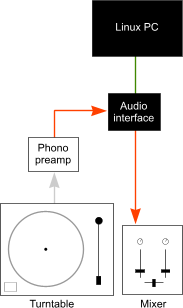
Indic BOFIndLinux Project BOF Indic BOF Indic BOF  Beacon project workout at foss.inBeacon Workout Apertium project talk Sharing ideas after Apertium talk Sachin Joshi ASR talk Sachin Joshi demo's his Hindi ASR system Flashing the Neo FreeRunner Connecting the FreeRunner with an USB cable and reseting it to boot from NOR dfu-util in action dfu-util in action flashing kernel/file system to neo freerunner dfu-util writes the kernel and File system images to the device Fedora Party On Just Messing Around ! OLPC XO in Foss.in Few more OLPC XO's sighted Lou Bébert brought it his ubuntu studio turntables hookup XwaX UI External USB sound card ( look at scheme diagram) Ubuntu Studio PC Aasim tries his hand at DJing Ramki nails another victim Don't wanna sing Don't wanna sing!

Thursday, April 17, 2008

Classmate 2 PC Review (Video )

Watch the latest Classmate 2 (aka "netbooks") announced by Andrew chien (Intel vice president, Corporate Technology Group and director of Intel Research) at Intel Developer Forum in Shanghai this month (April 2008).
Image Courtesy PC Watch
The second-generation Intel-powered classmate PC is powered by Intel® Atom™ Processor.

Darren Waters compares the Classmate 2 PC with the OLPC XO laptop .

id="showplayer"> type="application/x-shockwave-flash">

Wednesday, March 12, 2008

XP on XO soon

Last year I blogged in OLPC XO Production Delays, Microsoft Monster Catches Up about on the plans to run a Microsoft Windows OS on OLPC XO laptop something like this.
Yeah right, I guess a thousand slaves are working in dark dungeons trying to squeeze the Windows XP white elephant into the XO. :0)

It now seems that they are on the final stages of completing this Herculean technical feat according to this OLPC News story.
I guess its the end of the OLPC project. So long folks!.

Wednesday, February 27, 2008

Top 5 Sub $300 laptops compared

Amy wrote me to say 'just posted an article "Top 5 Sub-$300 Laptops Compared" . I thought I'd bring it to your attention just in case you think your readers would find it interesting.'

The post mentions 'Elonex ONE', 'Zonbu' and 'PC 2G Surf' which I have never heard of. Does anyone provide more information and comments about these devices.

Friday, February 1, 2008

OLPC XO-1 demo-ed at ILUG-Goa Meet

OLPC XO Laptop

This tiny and unusual computer was demoed at the monthly meeting of ILUG-Goa, the Free Software and Open Source user group that meets at the Goa Science Centre in Miramar, last Saturday (Jan 26, 2008).
Ms. Rut Pinto Viegas Jesus, a Copenhagen-based PhD researcher of Goan-Portuguese ancestry, managed to bring down one model of the computer, while visiting Goa on holiday and a family visit to her relations in Santa Cruz and Salcete.

The 4000-rupee computer shows up in Goa

Tuesday, November 27, 2007

OLPC XO Laptops for Africa

OLPC XO Laptop

BBC News special report on the OLPC XO Laptop experience in Nigeria.
The rugged, energy efficient laptops have been designed to be used in remote and environmentally challenging areas. They are currently being tested around the world, including at the LEA primary school, Galadima, on the outskirts of Abuja, Nigeria.
Don't miss this BBC News Special Report Audio slideshow: Laptops for Africa

Sunday, November 25, 2007

Is "OLPC Stomped" By Tech Giants (Intel) ?

OLPC XO Laptop

I haven't written about OLPC since the G1G1 (Give 1 Get 1) program started. Yesterday Wayan Vota of OLPCNews posted his views on Wall Street Journal's story A Little Laptop With Big Ambitions (How a Computer for the Poor Got Stomped by Tech Giants).

There is an interesting front page article on One Laptop Per Child this morning in the Wall Street Journal. Steve Stecklow takes the position that OLPC's computer for the poor was stomped by tech giants Intel and Microsoft.

I'd like to take the position that if OLPC is getting stomped (and I don't think its being "stomped" at all), its due to its own foolishness and arrogance, as much or more than any underhanded competition form Intel or Microsoft.

I've detailed my opinion here: www.olpcnews.com/commentary/press/wall_street....microsoft.html and I welcome your comments, opinions, and convictions.

Wednesday, October 31, 2007

OLPC India Experience

Indian Children exploring OLPC XO laptop

OLPC learning consultant Carla Gomez Monroy writes about the OLPC experience in Khairat school, Maharashtra (India). The site for OLPC pilot project in India.

At the entrance, there was a black dog taking a rest. Beside the dog was Rajiv, in first standard, working on his XO while it was charging, plugged to the outlet on the wall. At the foot of the wall, on a long mat, there were some XOs, being charged.

On the other side of the door, sitting on long, thin mats on the floor, there was a small group of girls and boys working on eToys. Some were trying out all the sample projects while others were making their own.

Read the Complete Khairat Chronicle on OLPC wiki.

OLPC (one laptop per child) XO Laptop Explained

OPLC XO laptop case and motherboard with labels BBC takes a comprehensive look at the hardware, software and design of the MIT's $100 OLPC XO laptop. The smart design of this machine is going to make the computer industry sit up and take notice.

Friday, October 26, 2007

OLPC XO Production Delays, Microsoft Monster Catches Up

OLPC XO is on my mind, the OLPC's Children's machine XO is up for grabs with its Give 1 Get 1 program from November 12. The low power consuming XO laptop with its open hardware specifications running Fedora Linux OS is on many geeks wish-list including mine for a while now. The news of production delays mean shortages, Aieee.

Elsewhere the Microsoft Corp seems to be "spending a non-trivial amount of money" into the works to make its Windows XP run on OLPC XO's hardware. Its Corporate Vice President Will Poole comments "We're spending a non-trivial amount of money on it, We're working hard. But we're still at least a few months away. We've made progress"

Yeah right, I guess a thousand slaves are working in dark dungeons trying to squeeze the Windows XP white elephant into the XO. :0)

Update: Mary Lou Jepsen, chief technology officer at the One Laptop Per Child organization here in Cambridge. Jepsen says that a Reuters report yesterday asserting that production delays will cause the organization to miss promised delivery dates for its famous (to some infamous) XO-1 Laptop was misleading.Complete Story here

Popular Posts